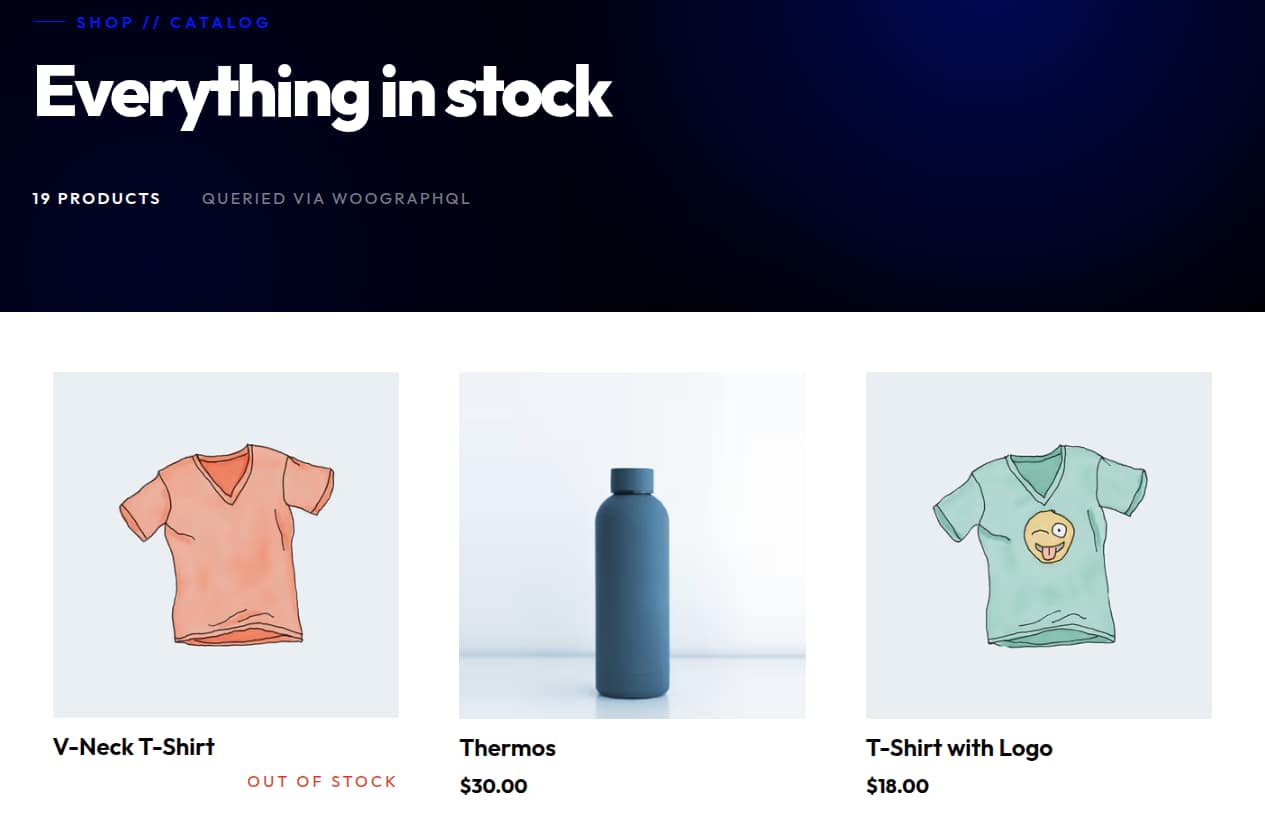
You’ve got the blog working. Now add the store. This walkthrough picks up exactly where the headless blog tutorial leaves off. Two new WordPress plugins, a route group split so the WP-rendered pages get their own root layout, and a single header — Cart-Token — bridging your Next.js session to WooCommerce’s Store API. The same app that’s serving your blog is now serving a storefront, with cart and checkout running through every WooCommerce extension you already have installed.
Companion repo: github.com/AxisTaylor/nextpress-woographql-quickstart. It’s nextpress-quickstart from the blog tutorial with everything in this post applied on top — clone it, run npm install && npm run dev, and you have the whole flow running against woographqldemo.wpengine.com.
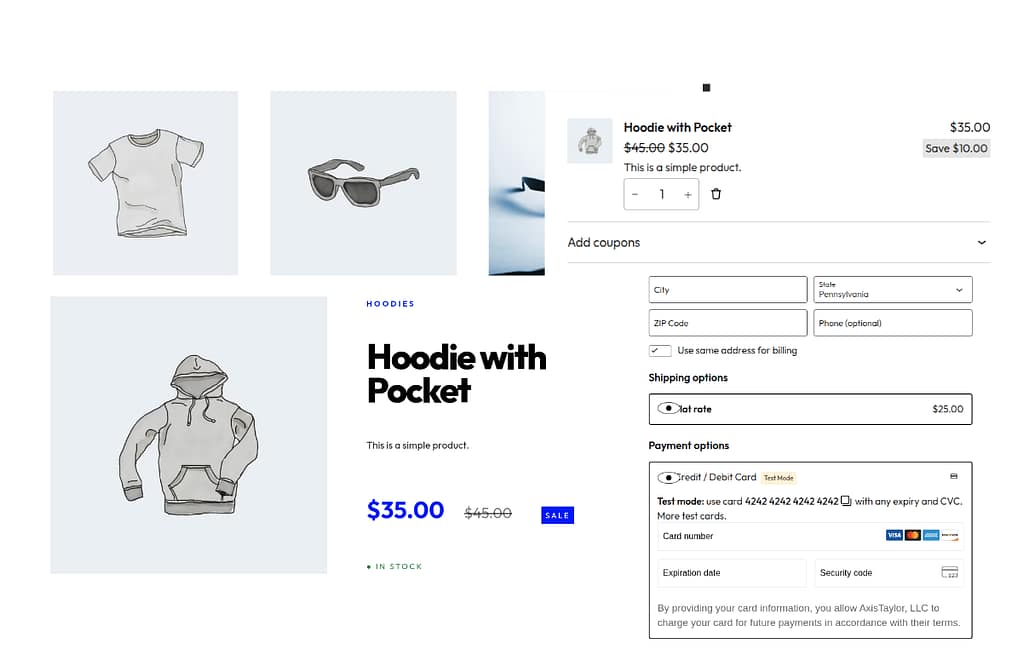
Who this is for
You have an existing Next.js app — yours, or the one you built following the blog tutorial. You want commerce: products, cart, checkout, payments, inventory, taxes, shipping, all of it. You’re not interested in writing those last six things from scratch. WooCommerce runs ~5 million live storefronts and the extension marketplace is the largest in any open-source commerce platform. The headless WordPress setup you built for the blog is also the headless WooCommerce setup — same backend, same proxy, two more plugins and a layout refactor.
A note on auth: there isn’t any
This tutorial walks through a guest-only storefront. No login page, no account dashboard, no JWT refresh loop. The Cart-Token WooCommerce hands back is itself the session identifier — a guest can browse, add to cart, check out, and look up their order with nothing but their billing email and the order key from their confirmation. That covers the entire happy path for most storefronts. If you do want authenticated customer accounts, wire up wp-graphql-headless-login or wp-graphql-jwt-authentication separately — it’s designed to plug in alongside the Cart-Token flow without disturbing it.
What changes from the blog tutorial
- Two new WP plugins: WooCommerce and WPGraphQL for WooCommerce.
- Route group split. Delete
app/layout.tsx. Move in-app routes intoapp/(main)/with their own root layout. Move WP-rendered routes (cart, checkout, blog) intoapp/(wordpress-pages)/with a separate root layout that puts<WPHead />inside<head>. Importmaps and script modules emitted by the WC checkout block only resolve correctly when the importmap tag lives in the document<head>, and a nested layout can’t put it there if there’s an outer root layout owning<html>. - Middleware bridges the session. Read the
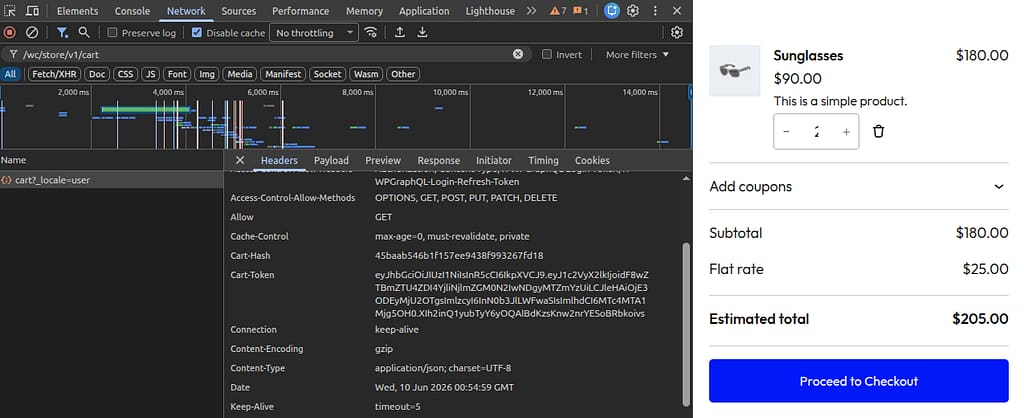
sessionTokencookie on every proxied WP REST / AJAX request, attach it as theCart-Tokenheader. Capture any rotatedCart-Tokenon the response and persist it back into the cookie so the next request stays in the same WC session. - Server-side GraphQL fetches forward the same header. Both
fetchPageByUriANDfetchAssetsByUrimust includeCart-Token. Skipping it onfetchAssetsByUriis the single sharpest gotcha — the WC checkout block server-renders against an empty cart and bakes a"Cannot create order from empty cart"error intowcSettings.checkoutData, and the page is permanently stuck. - A polished product page with a variation selector for variable products (matched by attribute
name, notlabel— there’s a subtle gotcha for local attributes). - Guest order lookup via a server action.
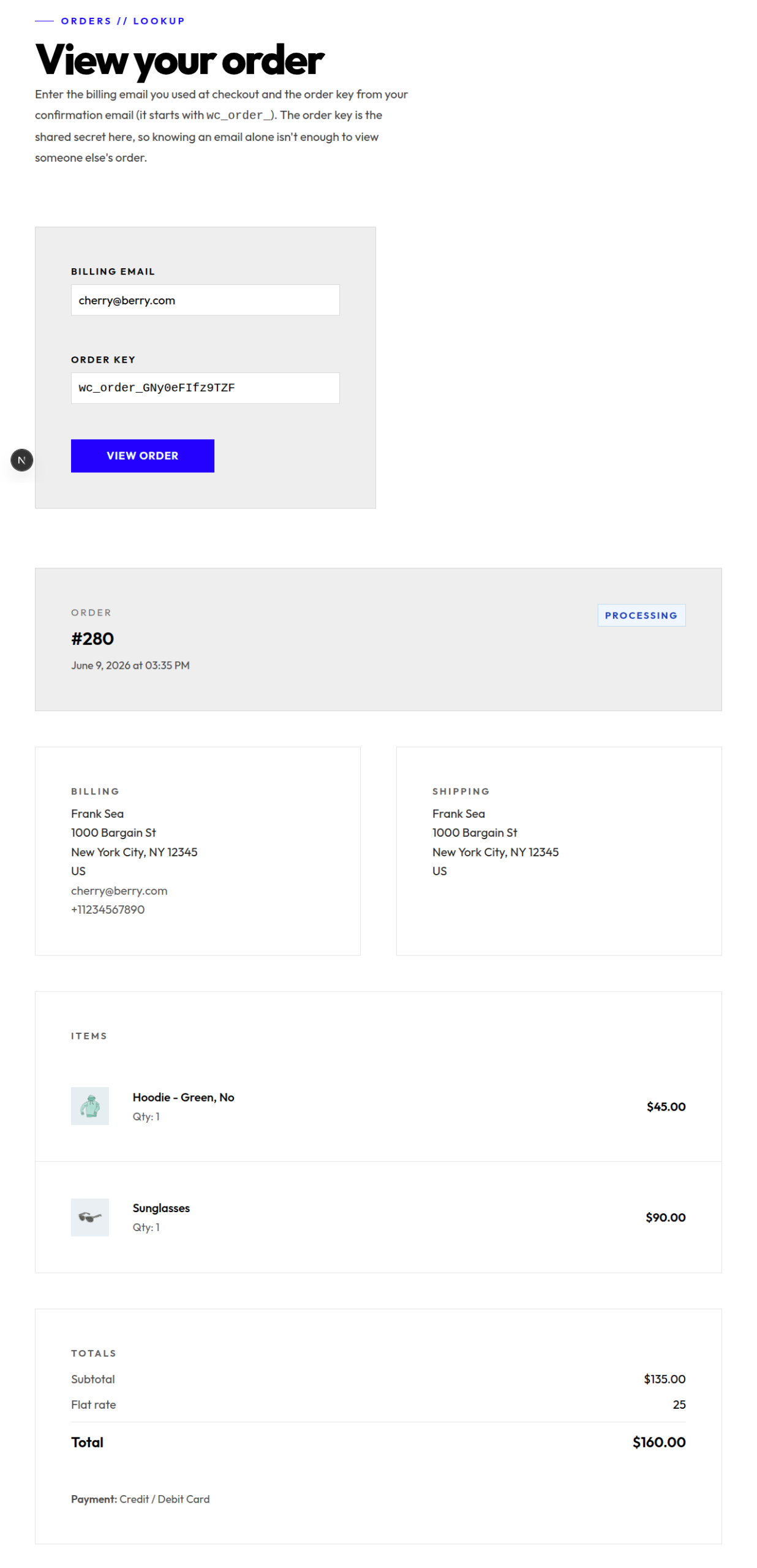
/view-ordertakes a billing email + order key and renders the order. The server action binds the email to the currentCart-Tokensession viaupdateCustomer, then narrows the orders connection by order key. No application password, no shop-manager account. - Automatic receipt at
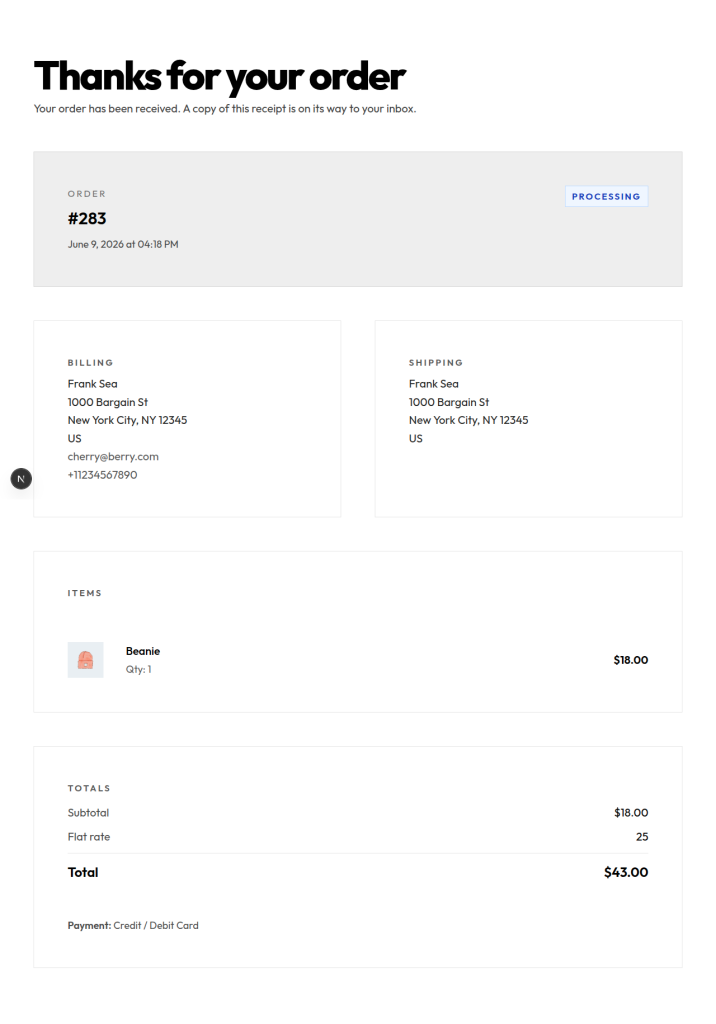
/checkout/order-received/[id]. A client component captures the billing email from the WC checkout block into a cookie. The receipt page reads the cookie + the?key=on the URL and looks up the order through the same server action — no form to fill in. - Product reviews wired through a tiny
/api/product/reviewroute that calls WooGraphQL’swriteReviewmutation with the Cart-Token forwarded.
Step 1 — Install two WP plugins
- WooCommerce — from the plugin directory. Run the setup wizard, drop in Stripe Test for payments, add a couple of demo products so there’s something to query. Confirm
/cartand/checkoutuse the block templates (default since Woo 8.3) rather than the legacy shortcodes — that’s what NextPress will proxy. - WPGraphQL for WooCommerce — adds the product, cart, customer, and order types to
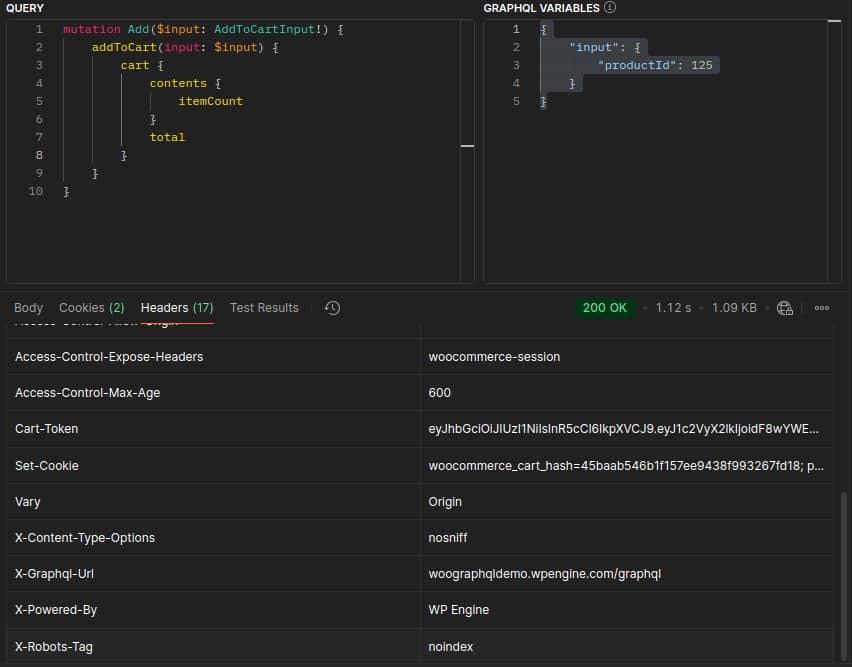
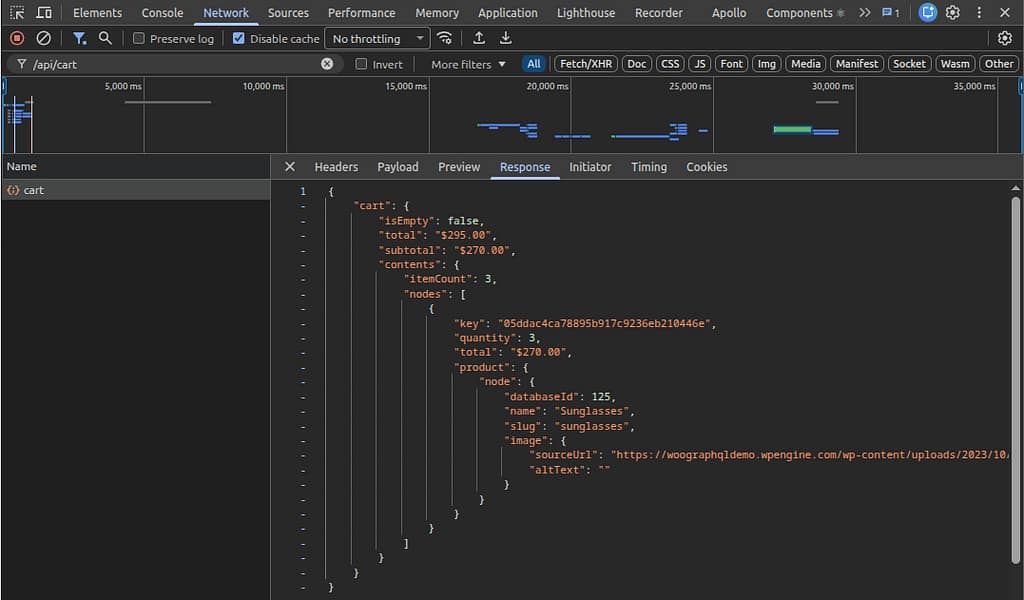
/graphql. Verify in Postman (or any HTTP client that surfaces response headers — GraphiQL hides them) by firing theaddToCartmutation against a realproductIdwith noCart-Tokenon the request. WP creates a fresh guest session and returns the JWT in theCart-Tokenresponse header.
mutation BootGuestSession {
  addToCart(input: { productId: 13, quantity: 1 }) {
    cart {
      contents { itemCount }
      total
    }
  }
}
The Cart-Token header only ships on cart and session mutations — addToCart, updateItemQuantity, removeItemsFromCart, applyCoupon, and friends. Plain queries against /graphql don’t produce one, and GraphiQL won’t show response headers anyway, which is why this verification step uses Postman. Once the middleware sees that header on a proxied response it persists the new value into the sessionToken cookie, and every subsequent request — REST calls from the checkout block, server-side GraphQL queries in your Next.js app — rides on it.
Step 2 — Route group split
This is the single biggest structural change. Delete app/layout.tsx. Move every route under one of two top-level route groups, each with its own root layout:
src/app/
├── api/
│   ├── cart/route.ts             ← cart mutations (server-only)
│   └── product/review/route.ts   ← review submission (server-only)
├── globals.css
├── (main)/                       ← in-app routes
│   ├── layout.tsx                ← <html>/<body> for the catalog + lookup surface
│   ├── page.tsx                  ← /
│   ├── products/
│   │   ├── page.tsx              ← /products
│   │   └── [slug]/page.tsx       ← /products/[slug] (Simple + Variable)
│   └── view-order/page.tsx       ← /view-order (guest order lookup)
└── (wordpress-pages)/            ← WP-rendered routes
    ├── layout.tsx                ← <html><head><WPHead /></head><body>
    ├── cart/page.tsx             ← /cart
    ├── checkout/
    │   ├── page.tsx              ← /checkout (+ CheckoutEmailCapture)
    │   └── order-received/[id]/page.tsx  ← auto-receipt
    └── blog/
        ├── page.tsx
        └── [slug]/page.tsx
Why? Next.js only allows <html> and <body> in root layouts. Without an app/layout.tsx, each top-level route group becomes its own root. The (wordpress-pages) root can put <WPHead /> directly inside <head> — which is where the <script type="importmap"> emitted for WC’s module-form scripts has to live. Try this with a nested layout under a single root and the importmap ends up in <body>; module scripts then fail to resolve @wordpress/plugins and the entire cart-block tree throws on init.
import { headers } from 'next/headers';
import { WPHead, WPFooter } from '@axistaylor/nextpress';
import { fetchAssetsByUri, fetchGlobalStyles } from '@/lib/wp';

export const dynamic = 'force-dynamic';

const CRITICAL_STYLESHEETS = [
  'wp-block-library', 'wp-block-library-theme', 'global-styles',
  'classic-theme-styles', 'wc-blocks-style', 'wc-blocks-vendors-style',
];

export default async function WordPressLayout({ children }) {
  const uri = (await headers()).get('x-uri') || '/';
  const [{ scripts, stylesheets, importMap }, globalStyles] = await Promise.all([
    fetchAssetsByUri(uri),
    fetchGlobalStyles(),
  ]);

  return (
    <html lang="en">
      <head>
        <WPHead
          scripts={scripts}
          stylesheets={stylesheets}
          globalStyles={globalStyles}
          importMap={importMap}
          pathname={uri}
          criticalHandles={CRITICAL_STYLESHEETS}
        />
      </head>
      <body>
        <main>{children}</main>
        <WPFooter scripts={scripts} pathname={uri} />
      </body>
    </html>
  );
}
Step 3 — Middleware bridges the Cart-Token
Update src/proxy.ts to attach the cart token to every proxied WP REST/AJAX request, then capture any rotated token WP writes back on the response. When the cart-block frontend fetches /wc/store/v1/cart from the browser, it goes through your NextPress proxy — and that proxy needs to translate your sessionToken cookie into the Cart-Token header WooCommerce expects. WooCommerce will occasionally rotate the token (after a cart mutation, a coupon apply, etc.); the response header is how it signals the new value.
import { NextResponse, NextRequest } from 'next/server';
import {
  proxyByWCR, isProxiedRoute,
  isWCAjaxRequest, isWPAjaxRequest, isWPRestRequest,
} from '@axistaylor/nextpress/proxyByWCR';

export const proxy = async (request: NextRequest) => {
  const pathname = request.nextUrl.pathname;

  // 1. Forward the Cart-Token on every proxied REST/AJAX call so the
  //    browser-side WC blocks land in the guest's actual cart session.
  if (
    isProxiedRoute(pathname) &&
    (isWPAjaxRequest(pathname) || isWCAjaxRequest(pathname) || isWPRestRequest(pathname))
  ) {
    const sessionToken = request.cookies.get('sessionToken')?.value;
    if (sessionToken) request.headers.set('Cart-Token', sessionToken);
  }

  // 2. Proxy the request, then capture any rotated Cart-Token WP writes
  //    back on the response and persist it as the sessionToken cookie.
  if (isProxiedRoute(pathname)) {
    const response = await proxyByWCR(request);
    const rotated = response.headers.get('Cart-Token');
    if (rotated) {
      const next = new NextResponse(response.body, {
        status: response.status,
        statusText: response.statusText,
        headers: response.headers,
      });
      next.cookies.set({
        name: 'sessionToken',
        value: rotated,
        path: '/',
        maxAge: 30 * 24 * 60 * 60,
        secure: process.env.NODE_ENV === 'production',
        httpOnly: true,
        sameSite: 'lax',
      });
      return next;
    }
    return response;
  }

  const headers = new Headers(request.headers);
  headers.set('x-uri', pathname);
  return NextResponse.next({ request: { headers } });
};

export const config = {
  matcher: [
    '/atx/:instance/proxiee',
    '/atx/:instance/wp',
    '/atx/:instance/wc',
    '/atx/:instance/wp-internal-assets/:path*',
    '/atx/:instance/wp-assets/:path*',
    '/atx/:instance/wp-json/:path*',
    '/((?!_next|api|favicon.ico|sw.js|.*\\.).*)',
  ],
};
Step 4 — GraphQL helpers that forward the token
Two helpers in src/lib/wp.ts talk to WPGraphQL: gqlWithSession for queries that need the cart session, and fetchAssetsByUri / fetchPageByUri which both use it. Both of these MUST forward the Cart-Token — and the second one is the gotcha.
import 'server-only';
import { cookies } from 'next/headers';

const endpoint = process.env.GRAPHQL_ENDPOINT as string;

interface FetchOptions { sessionToken?: string | null }

export async function gqlWithSession<T>(
  query: string,
  variables: Record<string, unknown> | undefined,
  options: FetchOptions = {},
) {
  const headers: Record<string, string> = { 'Content-Type': 'application/json' };
  if (options.sessionToken) headers['Cart-Token'] = `${options.sessionToken}`;

  const res = await fetch(endpoint, {
    method: 'POST',
    headers,
    body: JSON.stringify({ query, variables }),
    cache: 'no-store',
  });
  const json = await res.json();
  return { data: json.data ?? null, errors: json.errors };
}

// Critical: forward Cart-Token here too. The assetsByUri resolver
// triggers WP-side script enqueueing, which runs WC's
// hydrate_data_from_api_request for the checkout block. Without the
// header, wc()->cart is empty for that request, the hydrate produces
// "Cannot create order from empty cart", and that error ships in
// wcSettings.checkoutData → the checkout block's hasCheckoutError
// gate fires permanently.
export async function fetchAssetsByUri(uri: string) {
  const c = await cookies();
  const sessionToken = c.get('sessionToken')?.value ?? null;

  const { data } = await gqlWithSession<{ assetsByUri: any }>(
    `query ($uri: String!) {
       assetsByUri(uri: $uri) {
         importMap(scheme: RELATIVE) { name path }
         enqueuedStylesheets(first: 500) {
           nodes { handle src version before after }
         }
         enqueuedScripts(first: 500) {
           nodes { handle src strategy version group location type before after
                   dependencies { handle } }
         }
       }
     }`,
    { uri },
    { sessionToken },
  );
  const a = data?.assetsByUri;
  return a
    ? { scripts: a.enqueuedScripts.nodes, stylesheets: a.enqueuedStylesheets.nodes, importMap: a.importMap ?? [] }
    : { scripts: [], stylesheets: [], importMap: [] };
}

export async function fetchPageByUri(uri: string) {
  const c = await cookies();
  const sessionToken = c.get('sessionToken')?.value ?? null;

  const { data } = await gqlWithSession<{ page: any }>(
    `query ($uri: ID!) {
       page(id: $uri, idType: URI) { id title content contentCssClasses }
     }`,
    { uri },
    { sessionToken },
  );
  return data?.page ?? null;
}
That comment on fetchAssetsByUri isn’t decoration — it’s the entire reason /checkout fails silently if you forget it. WPGraphQL is fine, the browser’s REST calls work, the cart REST returns the right items — and the page still renders an empty-cart error because the WC blocks’ server-side preloaded data was generated against an empty cart session. Forwarding the token on both server-side GraphQL fetches closes the gap.
Step 5 — Cart as an API route
Add-to-cart, update-quantity, remove-from-cart — all flow through one /api/cart handler. The route reads sessionToken from cookies, runs the WPGraphQL mutation with Cart-Token attached, and returns the updated cart. The middleware from Step 3 takes care of persisting any rotated token on the way out.
import { NextRequest, NextResponse } from 'next/server';
import { cookies } from 'next/headers';
import { gqlWithSession } from '@/lib/wp';

const COOKIE_OPTS = { httpOnly: true, secure: true, sameSite: 'lax' as const, path: '/' };

async function readSession() {
  return { sessionToken: (await cookies()).get('sessionToken')?.value ?? null };
}

interface CartActionPayload {
  action: 'add' | 'update' | 'remove' | 'clear' | 'applyCoupon' | 'removeCoupon';
  productId?: number;
  variationId?: number;
  variation?: { attributeName: string; attributeValue: string }[];
  quantity?: number;
  key?: string;
  code?: string;
}

export async function POST(req: NextRequest) {
  const payload = (await req.json()) as CartActionPayload;
  const auth = await readSession();

  if (payload.action === 'add') {
    const result = await gqlWithSession<{ addToCart: { cart: unknown } }>(
      `mutation Add($input: AddToCartInput!) {
         addToCart(input: $input) { cart { contents { itemCount } total } }
       }`,
      { input: {
        productId: payload.productId,
        variationId: payload.variationId,
        variation: payload.variation,  // local-attribute variations need this
        quantity: payload.quantity ?? 1,
      } },
      auth,
    );
    if (result.errors?.length) {
      return NextResponse.json({ error: result.errors[0].message }, { status: 400 });
    }
    return NextResponse.json({ cart: result.data?.addToCart?.cart ?? null });
  }

  // …update / remove / applyCoupon / clear follow the same pattern
}
Note the variation array on the input. Variable-product add-to-cart needs it for variations that mix global and local attributes — see Step 7.
Step 6 — A polished product page
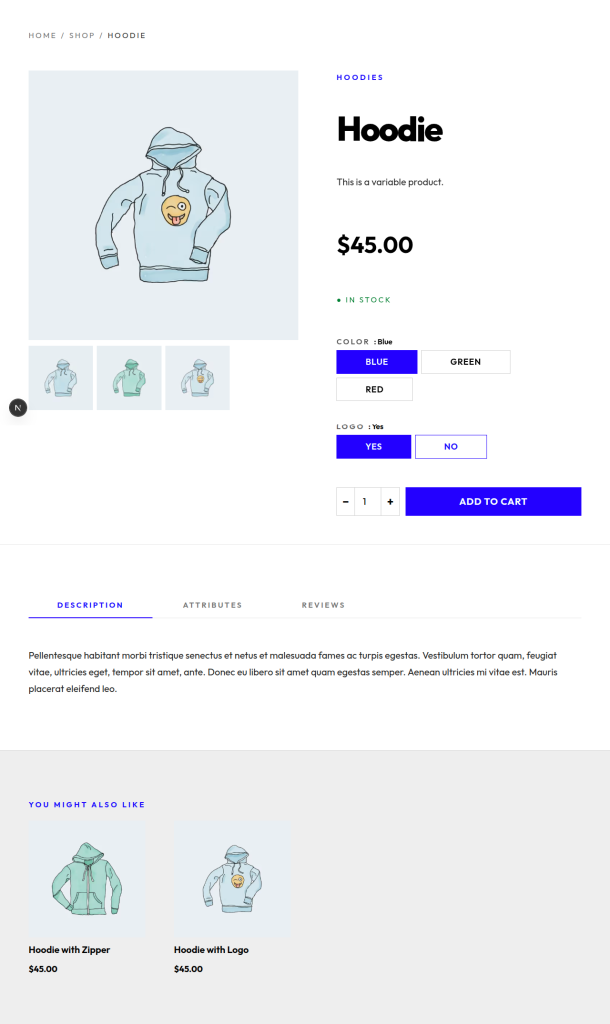
Product pages convert browsers into buyers, so this is where you spend real design time. Server component, ISR-cached, single GraphQL query for the entire view: title, hero image, gallery (honoring each image’s natural aspect ratio from mediaDetails), price + sale badge, stock badge, short + long descriptions, related products, breadcrumbs, and Product schema.org JSON-LD for Google Shopping. The page dispatches on __typename to one of two hero components. Both render mobile-first — most storefront traffic is mobile, and the screenshot below is the small-viewport view to prove it.
import { notFound } from 'next/navigation';
import { fetchProductBySlug, fetchProductSlugs } from '@/lib/wp';
import { SimpleProductHero } from '@/components/SimpleProductHero';
import { VariableProductHero } from '@/components/VariableProductHero';
import { ProductTabs } from '@/components/ProductTabs';

export const revalidate = 300;

export async function generateStaticParams() {
  return (await fetchProductSlugs()).map((slug) => ({ slug }));
}

export default async function ProductPage({ params }) {
  const { slug } = await params;
  const product = await fetchProductBySlug(slug);
  if (!product) notFound();

  return (
    <>
      <article className="grid lg:grid-cols-[1.1fr_1fr] gap-12 max-w-wide mx-auto px-x-small py-medium">
        {product.__typename === 'VariableProduct'
          ? <VariableProductHero product={product} />
          : <SimpleProductHero product={product} />}
      </article>
      <ProductTabs product={product} />
    </>
  );
}
Step 7 — Variations for variable products
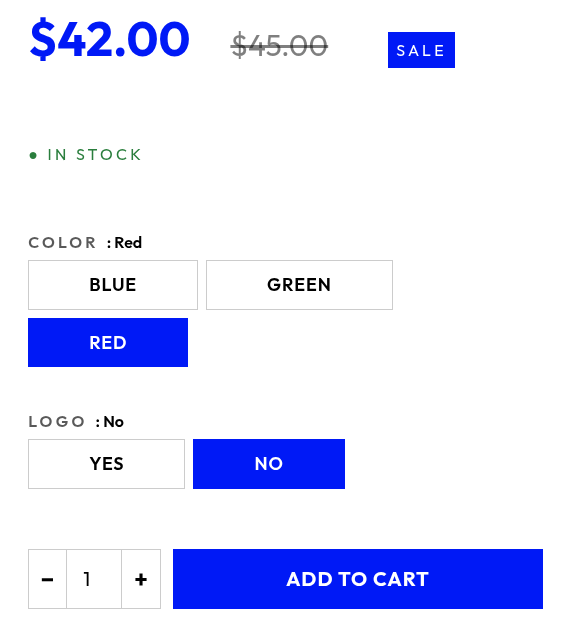
VariableProductHero is a client component that owns the attribute-selection state and lifts the price, image, and stock badge to the matched variation. Two small but load-bearing details:
- Match by
name, notlabel. For global attributes (taxonomy-backed:pa_color,pa_size), bothnameandlabelagree acrossProductAttributeandVariationAttribute. For local attributes (free-form on the product, no taxonomy),ProductAttribute.labelis the human form (“Logo”) butVariationAttribute.labelissanitize_title()’d (“logo”). The twolabelfields are not comparable.namegoes throughsanitize_title()on both sides, so it always agrees — match byname. - Send a
variationarray on add-to-cart. When the customer’s selection corresponds to a realvariationId, send both — it lets WooGraphQL pin the cart item to that variation regardless of whether the attributes are global or local.
// VariationAttribute.label is sanitize_title()'d for LOCAL attributes
// (e.g. "Logo" → "logo") but ProductAttribute.label is the human form
// ("Logo"). Both expose `name`, which is sanitize_title()'d on BOTH
// sides — so match by `name`, never by `label`.
export interface VariationAttrSel { name: string; value: string }

export function variationMatches(
  variationAttrs: { name: string; value: string }[],
  selection: VariationAttrSel[],
): boolean {
  if (variationAttrs.length === 0) return false;
  return variationAttrs.every((va) => {
    if (va.value === null) return true; // "any" — accepts everything
    const sel = selection.find((s) => s.name === va.name);
    return sel?.value === va.value;
  });
}

export function findMatchingVariation<V extends {
  attributes: { nodes: { name: string; value: string }[] };
}>(
  variations: V[],
  selection: VariationAttrSel[],
): V | undefined {
  return variations.find((v) =>
    variationMatches(v.attributes.nodes, selection));
}'use client';
import { useState } from 'react';
import { findMatchingVariation } from '@/lib/variation-helpers';
import { AddToCartButton } from './AddToCartButton';
export function VariableProductHero({ product }) {
const [selection, setSelection] = useState({});
const current = findMatchingVariation(product.variations.nodes,
Object.entries(selection).map(([name, value]) => ({ name, value })));
const price = current?.price ?? product.price;
const image = current?.image ?? product.image;
const inStock = (current?.stockStatus ?? product.stockStatus) !== 'OUT_OF_STOCK';
const variationPayload = Object.entries(selection)
.map(([attributeName, attributeValue]) => ({ attributeName, attributeValue }));
return (
<>
<ProductGallery image={image} gallery={product.galleryImages.nodes} />
<ProductInfo price={price} inStock={inStock}>
{product.attributes.nodes.map((attr) => (
<AttributePicker
key={attr.name}
attribute={attr}
value={selection[attr.name]}
onChange={(v) => setSelection((s) => ({ ...s, [attr.name]: v }))}
/>
))}
<AddToCartButton
productId={product.databaseId}
variationId={current?.databaseId}
variation={variationPayload}
inStock={inStock && !!current}
/>
</ProductInfo>
</>
);
}
Step 8 — Cart and checkout via the NextPress proxy
Two routes, twelve lines each. They live under (wordpress-pages) so they pick up the WP-rendering layout from Step 2:
import { notFound } from 'next/navigation';
import { Content, nextImageParser } from '@axistaylor/nextpress';
import { fetchPageByUri } from '@/lib/wp';

export default async function CartPage() {
  const page = await fetchPageByUri('/cart');
  if (!page) notFound();
  return (
    <article>
      <Content
        content={page.content}
        contentCssClasses={page.contentCssClasses}
        parsers={[nextImageParser()]}
      />
    </article>
  );
}
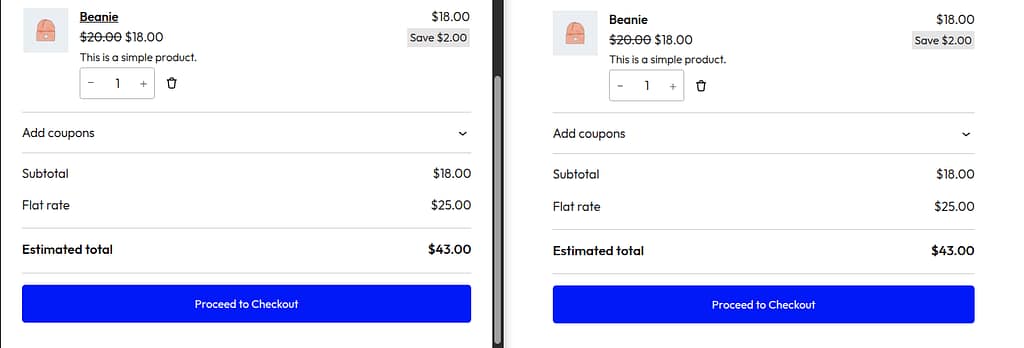
The (wordpress-pages) layout fetches the asset graph (with Cart-Token!), the page renders the WC cart block markup, and the cart-block frontend script takes over on hydration — using the same Cart-Token the middleware bridges through. Same shape for /checkout/page.tsx; same shape for the blog routes.
Step 9 — Guest order lookup via a server action
Once an order exists, the customer needs a way to see it. The standard WooCommerce flow puts the receipt on /checkout/order-received/[id], but it also needs a manual lookup page for repeat visits, lost confirmation tabs, and email follow-up links. /view-order is that page — a server component with a form, posting to a server action.
The action does something subtle: updateCustomer without an id targets the customer attached to the current Cart-Token session. Setting billing.email binds that session to the email; the customer’s orders connection then returns every order placed against that address — including guest orders, which is the whole point. The action narrows by orderKey, which acts as a shared secret: knowing an email alone isn’t enough to surface someone else’s order.
'use server';
import { cookies } from 'next/headers';
import { revalidatePath } from 'next/cache';
import { gqlWithSession, type Order, ORDER_FRAGMENT } from '@/lib/wp';
import { LOOKUP_COOKIE, ERROR_COOKIE } from '@/utils/constants';

const FIND_ORDER_MUTATION = /* GraphQL */ `
  ${ORDER_FRAGMENT}
  mutation BindEmailAndFindOrder($input: UpdateCustomerInput!) {
    updateCustomer(input: $input) {
      customer {
        orders(first: 100) {
          nodes { ...OrderFields }
        }
      }
    }
  }
`;

// Running updateCustomer without an `id` applies the mutation to the
// customer attached to the current Cart-Token session. Setting
// billing.email binds that session to the email; the customer's
// orders connection then returns every order placed against that
// address — including guest orders. We narrow by orderKey, which
// acts as a shared secret: knowing an email alone isn't enough to
// surface someone else's order.
//
// This runs only via server-action invocations, so the GraphQL
// endpoint and the customer-binding semantics never reach the
// client. Tutorial readers don't need an application password — the
// session's own Cart-Token authenticates the mutation.
export async function lookupOrder(
  email: string,
  orderKey: string,
): Promise<{ order?: Order; error?: string }> {
  if (!email?.trim() || !orderKey?.trim()) {
    return { error: 'Email and order key are required.' };
  }

  const sessionToken = (await cookies()).get('sessionToken')?.value ?? null;
  const result = await gqlWithSession<{
    updateCustomer: { customer: { orders: { nodes: Order[] } } | null } | null;
  }>(
    FIND_ORDER_MUTATION,
    { input: { billing: { email: email.trim() } } },
    { sessionToken },
  );

  if (result.errors?.length) return { error: result.errors[0].message };
  const orders = result.data?.updateCustomer?.customer?.orders?.nodes ?? [];
  const match = orders.find((o) => o.orderKey === orderKey.trim());
  if (!match) return { error: 'No order found for that email and order key.' };
  return { order: match };
}

export async function lookupOrderFormAction(formData: FormData): Promise<void> {
  const email = String(formData.get('email') ?? '').trim();
  const orderKey = String(formData.get('orderKey') ?? '').trim();
  const result = await lookupOrder(email, orderKey);

  const jar = await cookies();
  if (result.error || !result.order) {
    jar.set(ERROR_COOKIE, result.error ?? 'Order not found.',
      { path: '/', sameSite: 'lax', maxAge: 60 });
    jar.delete(LOOKUP_COOKIE);
  } else {
    jar.set(LOOKUP_COOKIE, JSON.stringify({ email, orderKey }), {
      httpOnly: true,
      secure: process.env.NODE_ENV === 'production',
      sameSite: 'lax', path: '/', maxAge: 60 * 60 * 24,
    });
    jar.delete(ERROR_COOKIE);
  }
  revalidatePath('/view-order');
}
What this avoids: hand-rolling a shop-manager application password into the demo. Tutorial readers don’t have one, and shipping the tutorial with “here, paste your admin credentials into .env” would be irresponsible. The Cart-Token-as-shared-secret pattern keeps everything inside the existing session model.
Step 10 — Automatic receipt at /checkout/order-received
When WooCommerce redirects the customer after a successful checkout, the URL is /checkout/order-received/[id]?key=wc_order_…. The key is the order key. The email isn’t in the URL — it’s in the WC checkout block’s billing form, which the customer just filled in. We capture that email client-side into a cookie, then the receipt page reads cookie + URL key and runs the same lookupOrder server action from Step 9.
The capture component sounds straightforward (read a couple of email inputs, write to a cookie) but the WC checkout block is fussy: it mounts its fields async, re-mounts the billing fieldset when “Use shipping address for billing” toggles, AND — the surprise — hydrates field values from its own session storage without firing input or change events. A delegated input listener alone will miss the autofill entirely. Three sources cover the gap:
- Initial DOM scan on mount — catches values already present at render time (autofill, browser autocomplete).
- MutationObserver on
document.bodywithattributeFilter: ['value']— catches late-mounted inputs and session-restored value writes. - Capture-phase
input/changedelegation ondocument— catches live typing.
'use client';
import { useEffect } from 'react';
import { CHECKOUT_EMAIL_COOKIE } from '@/utils/constants';

// The WC checkout block mounts its fields asynchronously and re-mounts
// the billing fieldset when the customer toggles "Use shipping for
// billing". It also hydrates values from its own session storage
// WITHOUT firing input/change events — so a delegated listener alone
// misses the autofilled email. We need three sources:
//   1. Initial DOM scan at mount  — catches values already present.
//   2. MutationObserver           — catches late-mounted inputs and
//                                   session-restored value writes.
//   3. input/change delegation    — catches live user typing.
function isEmailField(el: Element | null): el is HTMLInputElement {
  if (!(el instanceof HTMLInputElement)) return false;
  if (el.type === 'email') return true;
  const probe = `${el.name} ${el.id} ${el.autocomplete}`.toLowerCase();
  return probe.includes('email');
}

function writeCookie(value: string): void {
  const trimmed = value.trim();
  if (!trimmed) return;
  const secure = location.protocol === 'https:' ? '; secure' : '';
  document.cookie = `${CHECKOUT_EMAIL_COOKIE}=${encodeURIComponent(trimmed)}; ` +
    `path=/; max-age=3600; samesite=lax${secure}`;
}

function scan(root: ParentNode): void {
  root.querySelectorAll<HTMLInputElement>(
    'input[type="email"], input[name*="email" i], input[id*="email" i], input[autocomplete*="email" i]',
  ).forEach((el) => { if (isEmailField(el) && el.value) writeCookie(el.value); });
}

export function CheckoutEmailCapture() {
  useEffect(() => {
    scan(document);

    const handler = (e: Event) => {
      if (e.target instanceof Element && isEmailField(e.target)) {
        writeCookie((e.target as HTMLInputElement).value);
      }
    };
    document.addEventListener('input', handler, true);
    document.addEventListener('change', handler, true);

    const observer = new MutationObserver((muts) => {
      for (const m of muts) {
        m.addedNodes.forEach((n) => { if (n instanceof Element) scan(n); });
        if (m.type === 'attributes' && m.target instanceof HTMLInputElement
            && isEmailField(m.target)) {
          writeCookie(m.target.value);
        }
      }
    });
    observer.observe(document.body, {
      subtree: true, childList: true,
      attributes: true, attributeFilter: ['value'],
    });

    return () => {
      document.removeEventListener('input', handler, true);
      document.removeEventListener('change', handler, true);
      observer.disconnect();
    };
  }, []);
  return null;
}
Mount that on /checkout/page.tsx next to the <Content> block and the cookie is set by the time the customer clicks Place Order. The receipt page reads it and renders — no form, no extra click.
import Link from 'next/link';
import { cookies } from 'next/headers';
import { OrderSummary } from '@/components/OrderSummary';
import { lookupOrder } from '@/actions/order';
import { CHECKOUT_EMAIL_COOKIE } from '@/utils/constants';

interface Props {
  params: Promise<{ id: string }>;
  searchParams: Promise<{ key?: string }>;
}

export default async function OrderReceivedPage({ params, searchParams }: Props) {
  const { id } = await params;
  const { key } = await searchParams;
  const email = (await cookies()).get(CHECKOUT_EMAIL_COOKIE)?.value ?? '';
  const fallback = key ? `/view-order?key=${encodeURIComponent(key)}` : '/view-order';

  if (!key || !email) {
    return (
      <main>
        <h1>Thanks for your order</h1>
        <p>We couldn't auto-load the receipt because your billing email isn't
          available on this device. Look up the order with the email you used at
          checkout — the order key from your confirmation email is the shared
          secret.</p>
        <Link href={fallback}>Look up the order</Link>
      </main>
    );
  }

  const { order, error } = await lookupOrder(email, key);
  if (!order) {
    return (
      <main>
        <h1>Thanks for your order</h1>
        <p className="error">{error ?? "We couldn't find that order."}</p>
        <Link href={fallback}>Look up the order</Link>
      </main>
    );
  }

  return (
    <main>
      <OrderSummary
        order={order}
        headline="Thanks for your order"
        intro="Your order has been received. A copy of this receipt is on its way to your inbox."
      />
    </main>
  );
}
The fallback link to /view-order?key=… matters for the “customer reopened the receipt email three days later on a new device” case — the cookie is gone, but the order key in the email still works for manual lookup.
Step 11 — Product reviews
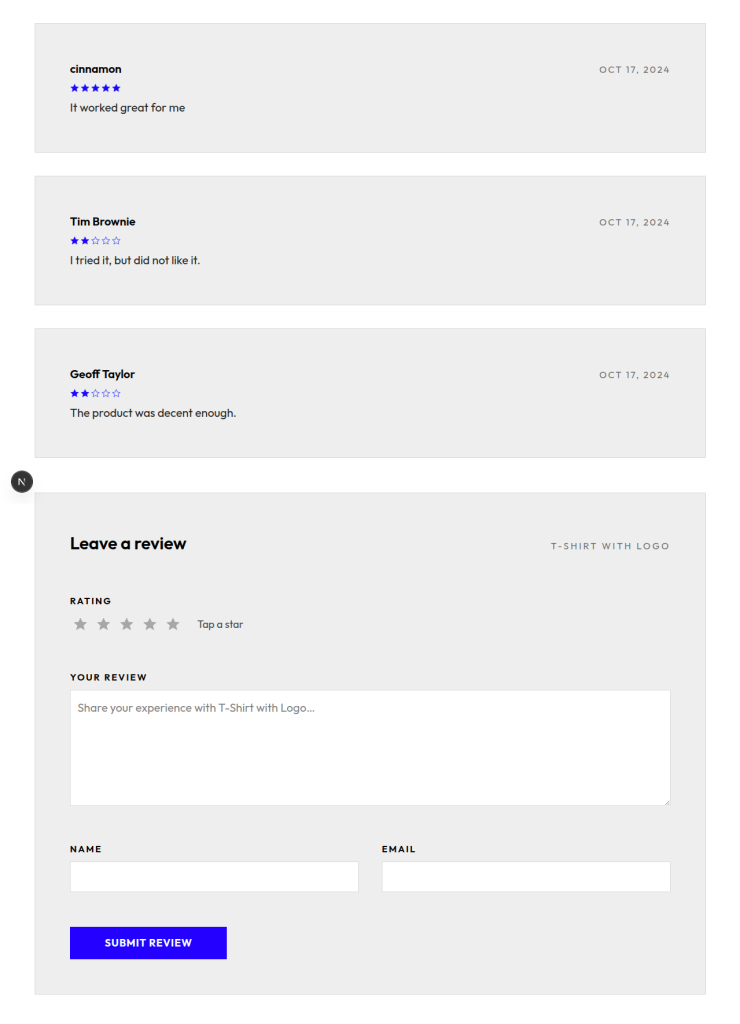
Reviews are a tiny POST handler that calls WooGraphQL’s writeReview mutation. The client form sends productId, author name, email, rating, and content; the route attaches Cart-Token, runs the mutation, and the WP backend handles moderation queue, spam check, and storage.
import { NextRequest, NextResponse } from 'next/server';
import { cookies } from 'next/headers';
import { gqlWithSession } from '@/lib/wp';

export async function POST(req: NextRequest) {
  const { productId, author, email, content, rating } = await req.json();
  const sessionToken = (await cookies()).get('sessionToken')?.value ?? null;

  const result = await gqlWithSession<{ writeReview: { rating: number } }>(
    `mutation Write($input: WriteReviewInput!) {
       writeReview(input: $input) {
         rating
         review { id }
       }
     }`,
    { input: {
      commentOn: productId,
      author, authorEmail: email,
      content, rating,
    } },
    { sessionToken },
  );

  if (result.errors?.length) {
    return NextResponse.json({ error: result.errors[0].message }, { status: 400 });
  }
  return NextResponse.json({ ok: true, rating: result.data?.writeReview?.rating });
}
Wire it up to a <ReviewForm /> client component inside <ProductTabs /> on the product page. The review list itself is rendered server-side from the same product query; pagination is whatever you want it to be.
Smoke-test the full flow
End-to-end: visit /products/hoodie, pick a color + logo variant, click Add to cart, land on /cart with the item showing, click Proceed to checkout, fill in Stripe Test card 4242 4242 4242 4242, place the order, land on /checkout/order-received/[id]?key=… with the full receipt rendered automatically. Five clicks, single Next.js host, full WooCommerce backend orchestration. No login, no account, no JWT refresh loop.
If the checkout page renders “Cannot create order from empty cart” — that’s the fetchAssetsByUri gotcha from Step 4. Open the request to /graphql that runs assetsByUri on the SSR side and verify it carries the Cart-Token header. The cart-block frontend will populate from REST regardless, but the checkout block’s preloaded wcSettings.checkoutData is generated server-side at asset-fetch time and gates the entire UI.
What you didn’t build
- Payment gateways — Stripe, PayPal, Square, Klarna, ~50 others
- Tax engines — WooCommerce Tax (free), Avalara, TaxJar
- Shipping rate APIs — USPS, UPS, FedEx, DHL, custom flat-rate logic
- Subscriptions — billing cycles, trials, dunning, prorated upgrades
- Inventory — stock levels, low-stock notifications, back-orders, per-variant tracking
- Coupon engine — usage limits, customer segments, product/category restrictions
- Order management — refunds, partial refunds, order notes, customer emails
- Review moderation — spam check, profanity filter, queue UI
WooCommerce handles all of it. You handle the product page UX and the storefront chrome. NextPress connects the two without making you choose between “looks the way I want” and “works with the extensions I bought.”
The shortcut: a WooGraphQL Pro subscription
Everything above is the open-source path. It’s a few hundred lines of new code on top of the blog tutorial, no extra dependencies, and the demo repo ships ready to clone. If your team’s time is better spent on storefront UX than on writing session-management lifecycle code, that’s exactly what a WooGraphQL Pro subscription is for.
A subscription bundles three things:
The WooGraphQL Pro plugin
A WordPress plugin that extends the GraphQL schema with types, queries, and mutations for the WooCommerce product variants you actually sell: Subscriptions, Composite Products, Product Bundles, and Product Add-Ons. The free WooGraphQL schema only exposes Simple and Variable products; the moment your catalog includes a bundle or a subscription, you’re hand-rolling REST fallbacks. With the Pro plugin, those product types are first-class in the schema, and a single { product(id: …) } query returns whatever shape that product happens to be.
The create-woonext-app CLI
A scaffolder that works like create-next-app, but the boilerplate it generates is a working Next.js + WooGraphQL storefront. npx create-woonext-app my-shop, point it at your WP backend, and you’ve got product pages, cart, checkout, and account flows running end-to-end before you touch a file — all wired up with the Pro hooks and components below.
The @woographql/* JS packages
- @woographql/next — a component-generation toolkit that works the same way shadcn/ui does: run a command, the component lands in your repo, you own and customize the code. The component library covers the full storefront surface —
CartOptionsalone renders the cart-action UI for every product type Woo supports (Simple, Variable, Composite, Bundle, Subscription, Add-On), with form state and validation already wired. - @woographql/react-hooks — typed hooks that collapse the lifecycle code you wrote above.
useSessionManager()replaces the cookie-juggling, the cart-token rotation, and the SSR-time header forwarding.useCartMutations()replaces the/api/cartroute plus the client glue, with optimistic updates and per-key error rollback included. - @woographql/session-utils — the lower-level building blocks behind those hooks: token encryption, cookie/storage abstraction, signed-state serialization. The bits you’d rather not reimplement once you’ve shipped your second Woo storefront on Next.
Pick the open-source path if you want to understand what’s happening under the hood — it’s a great place to start, and the code stays yours forever. Pick the subscription if you’d rather ship the storefront and not become a session-management library author. Either way, the architecture in this tutorial is the right architecture; the subscription just gives you the polished version of the lifecycle code as a typed, tested dependency.
When this is the wrong call
- Greenfield project with no commerce dependencies and a single-product catalog. Stripe Checkout + a custom React storefront ships faster. Pulling in WP + Woo is overkill until you need taxes, shipping, or multiple SKUs.
- Hand-priced B2B quotes. The cart-builder workflow for “request a quote, get pricing, convert to order” doesn’t map cleanly onto Woo’s catalog model without significant custom work.
- Multi-vendor marketplaces. Woo has multi-vendor extensions but they’re complex; a marketplace-native platform like Medusa is usually a better fit.
For the rest — most apps that need commerce, especially ones already serving content from WordPress — adding Woo as the commerce backend and NextPress as the bridge gets you to “selling product on the same Next.js host as the rest of the site” in an afternoon. Subscriptions, custom payment gateways, multi-currency, abandoned-cart recovery, B2B pricing tiers — they’re extension installs against the WP admin, not refactors against your app.
Leave a Reply