20 minutes. Five files. A create-next-app project pulls posts from a WordPress install over WPGraphQL, the editor still owns every paragraph, and next build ships static pages with revalidate set to whatever number you want. The walk-through below points at woographqldemo.wpengine.com — swap in your own domain at the end and the same six steps apply.
What’s in the box
@axistaylor/nextpress is one npm package and roughly 6,000 lines of TypeScript. It carries three pieces you wire into a Next.js 16 app:
withWCR— aNextConfigwrapper that sets up the WP reverse-proxy domain and forwards/wp-content,/wp-admin, and/graphqlthrough the Next runtime.<Content>— a React component that takes the raw HTML WordPress returns and renders it as real React nodes, plus the per-block CSS each one needs.nextImageParser— a parser that swaps every<img>in WP content for anext/imagewithwidth,height, andsizespulled from the block attributes.
Backend requirement: WordPress with WPGraphQL active. Any host works — WP Engine, Pantheon, Bluehost, a self-managed VPS — as long as /graphql responds.
Step 1 — Bootstrap the Next app
Stock create-next-app with the TypeScript template, then add @axistaylor/nextpress from npm:
npx create-next-app@latest nextpress-quickstart
cd nextpress-quickstart
npm install @axistaylor/nextpress
Step 2 — next.config.ts
withWCR takes three arguments: the base Next config, the WordPress origin, and the public-facing frontend origin. The wrapper rewrites every absolute WordPress URL the editor authored into a frontend-relative path so links inside rendered post content land back on your Next routes.
import type { NextConfig } from "next";
import { withWCR } from "@axistaylor/nextpress/withWCR";

const wpDomain = "woographqldemo.wpengine.com";
const wpProtocol = "https";

const nextConfig: NextConfig = {
  images: {
    formats: ["image/avif", "image/webp"],
    remotePatterns: [{ protocol: "https", hostname: wpDomain }],
  },
  env: {
    GRAPHQL_ENDPOINT: `${wpProtocol}://${wpDomain}/graphql`,
  },
};

export default withWCR(
  nextConfig,
  {
    wpDomain,
    wpProtocol,
    wpHomeUrl: `${wpProtocol}://${wpDomain}`,
    wpSiteUrl: `${wpProtocol}://${wpDomain}`,
  },
  {
    frontendDomain: "localhost:3000",
    frontendProtocol: "http",
  },
);
Step 3 — src/proxy.ts
Next 16 renamed middleware.ts to proxy.ts; the role and matcher behaviour didn’t change. The handler does two things — forward the /wp-* paths through proxyByWCR so the browser never touches the WordPress origin, and set an x-uri header on every non-proxied request so server components downstream know which URI to ask the backend for enqueued scripts and stylesheets:
import { NextResponse, NextRequest } from "next/server";
import { proxyByWCR, isProxiedRoute } from "@axistaylor/nextpress/proxyByWCR";

export const proxy = async (request: NextRequest) => {
  const pathname = request.nextUrl.pathname;

  if (isProxiedRoute(pathname)) {
    return proxyByWCR(request);
  }

  const headers = new Headers(request.headers);
  headers.set("x-uri", pathname);
  return NextResponse.next({ request: { headers } });
};

export const config = {
  matcher: [
    "/atx/:instance/proxiee",
    "/atx/:instance/wp",
    "/atx/:instance/wc",
    "/atx/:instance/wp-internal-assets/:path*",
    "/atx/:instance/wp-assets/:path*",
    "/atx/:instance/wp-json/:path*",
    "/((?!_next|api|favicon.ico|sw.js|.*\\.).*)",
  ],
};
Step 4 — src/lib/wp.ts
Three async functions, one shared fetch wrapper. fetchPosts feeds the index page, fetchPostBySlug feeds the post page, fetchPostSlugs drives generateStaticParams. The next: { revalidate: 60 } hint on the fetch is the only cache control you need — Next handles the rest:
const ENDPOINT = process.env.GRAPHQL_ENDPOINT!;

async function gql<T>(query: string, variables: Record<string, unknown> = {}): Promise<T> {
  const res = await fetch(ENDPOINT, {
    method: "POST",
    headers: { "Content-Type": "application/json" },
    body: JSON.stringify({ query, variables }),
    next: { revalidate: 60 },
  });
  if (!res.ok) throw new Error(`WPGraphQL ${res.status}`);
  const { data, errors } = await res.json();
  if (errors?.length) throw new Error(errors[0].message);
  return data as T;
}

export interface PostSummary {
  slug: string;
  title: string;
  date: string;
  excerpt: string | null;
  featuredImage: { sourceUrl: string; altText: string } | null;
}

export interface Post extends PostSummary {
  content: string;
  contentCssClasses: string;
}

export async function fetchPosts(first = 20): Promise<PostSummary[]> {
  const data = await gql<{ posts: { nodes: PostSummary[] } }>(`
    query Posts($first: Int!) {
      posts(first: $first, where: { status: PUBLISH, orderby: { field: DATE, order: DESC } }) {
        nodes {
          slug title date excerpt
          featuredImage { node { sourceUrl altText } }
        }
      }
    }`, { first });
  return data.posts.nodes;
}

export async function fetchPostSlugs(): Promise<string[]> {
  const data = await gql<{ posts: { nodes: { slug: string }[] } }>(`
    { posts(first: 100, where: { status: PUBLISH }) { nodes { slug } } }`);
  return data.posts.nodes.map(n => n.slug);
}

export async function fetchPostBySlug(slug: string): Promise<Post | null> {
  const data = await gql<{ post: Post | null }>(`
    query Post($slug: ID!) {
      post(id: $slug, idType: SLUG) {
        slug title date excerpt
        content(format: RENDERED)
        contentCssClasses
        featuredImage { node { sourceUrl altText } }
      }
    }`, { slug });
  return data.post;
}
Step 5 — /blog index
A server component, one await, no client hooks. The post array is just JSX:
import Link from "next/link";
import { fetchPosts } from "@/lib/wp";

export const metadata = { title: "Blog" };

export default async function BlogIndex() {
  const posts = await fetchPosts(20);
  return (
    <ul>
      {posts.map((post) => (
        <li key={post.slug}>
          <Link href={`/blog/${post.slug}`}>{post.title}</Link>
          <time>{new Date(post.date).toLocaleDateString()}</time>
        </li>
      ))}
    </ul>
  );
}
Step 6 — /blog/[slug]
generateStaticParams turns every published slug into a build-time route. The render is two lines: a heading and a <Content>.
import { notFound } from "next/navigation";
import { Content, nextImageParser } from "@axistaylor/nextpress";
import { fetchPostBySlug, fetchPostSlugs } from "@/lib/wp";

export async function generateStaticParams() {
  const slugs = await fetchPostSlugs();
  return slugs.map((slug) => ({ slug }));
}

export default async function PostPage({ params }: {
  params: Promise<{ slug: string }>;
}) {
  const { slug } = await params;
  const post = await fetchPostBySlug(slug);
  if (!post) notFound();

  return (
    <article>
      <h1>{post.title}</h1>
      <Content
        content={post.content}
        contentCssClasses={post.contentCssClasses}
        parsers={[nextImageParser()]}
      />
    </article>
  );
}
Five files, two domains, one npx. The editor never moves; the delivery layer changes underneath it.
What <Content> does for you
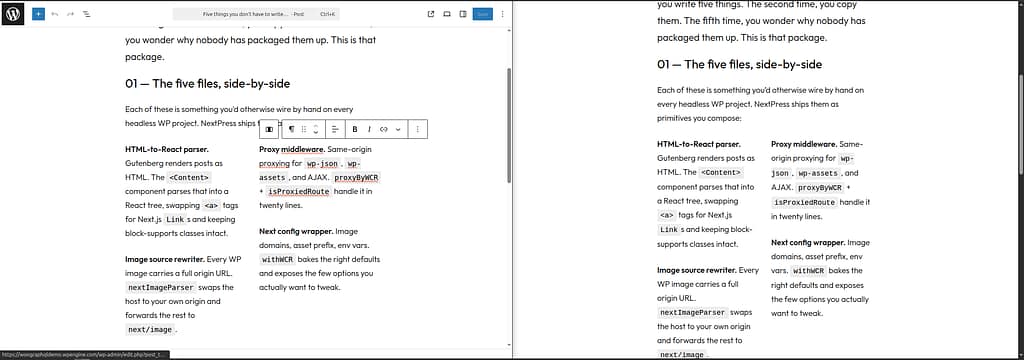
The post body is a string of WordPress block HTML. Pasting it into a dangerouslySetInnerHTML would render it, but you’d lose three things in the process. <Content> handles them:
- Parses the HTML into a React tree. Every
<p>,<figure>,<blockquote>is a real React node you can override with a parser — that’s hownextImageParserswaps<img>fornext/imagewith zero markup changes upstream. - Pulls each block’s CSS into the response. Block-supports inline rules, theme.json palette tokens, plugin-injected sheets — they ship inline with the page so there’s no layout shift after hydration.
- Keeps
<script type="application/json">blobs intact. That’s how interactive blocks (motion engines, accordions, anything with a view-script) hand state to their client-side code without a separate API roundtrip.
Next moves
The same six files extend in a few obvious directions. Categories and tags are one more WPGraphQL where argument on fetchPosts. Comments and pagination ride along on the same query. Search hits the search argument and you ship a /search?q=... route in another twenty minutes.
Full source on GitHub. Package docs at /docs/nextpress. If you want the architectural why behind keeping WordPress and adding Next.js as a delivery layer, that piece is coming.
Leave a Reply