注意: 此教程包含更早的 WooGraphQL 出放, 已不更新 。 有相關的相關相關相關相關相關相關相關相關相關相關相關相關相關相關相關相關相關相關相關相關相關相關相關相關相關相關相關相關相關相關相關相關相關相關相關相關相關相關相關相關相關相關相關相關相關相關相關相關相關相關相關相關相關相關相關相關相關相關相關相關相關相關相關相關相關相關相關相關相關相關相關相關相關相關相關相關相關相關相相相相關相相相相關相關相相關相相相相關相相相關相相相相關相相相相相相相相相相相相相相相相相相相相相相相相相相相相相相相相相相相相相相相相相相相相相相相相相相相相相相相相相相相相相相相相相相相
表格
- 为您的無頭通訊應用程式設定文字通訊
- 为發展而建立和啟用您的eCommerce App
- 有 WooGraphQL 的商店上市頁面
- 建立使用者登入和通訊
- 建立產品頁面和墨盒選項
歡迎收看相關相關相關相關相關相關相關相關相關相關相關相關相關相關相關相關相關相關相關相關相關相關相關相關相關相關相關相關相關相關相關相關相關相關相關相關相關相關相關相關相關相關相關相關相關相關相關相關相關相關相關相關相關相關相關相關相關相關相關相關相關相關相關相關相關相關相關相關相關相關相關相關相關相關相關相關相相相關相相相相相關相相相相相相相相相相相關相相相相相相相相相相相相相相相相相相相相相相相相相相相相相相相相相相相相相相相相相相相相相相相相相相相相相相相相相相相相相相相相相相相相相相相相相相相相相相 這章是用 WooGraphQL + Next 13 建立商店上市頁面的一步一步走過. 在你的電子商業相關平台上,
有 WooGraphQL 的商店上市頁面
我們先用很少到沒有過滤取功能去建立商店頁面,再用實取滤取功能去完成,并相對地更新了每個元件. 就快出發了!
第1部分: 編輯根佈局
我們將先修改根佈局以包含上方通航 。
1. 更新 /app/layout.tsx:
// 應用程式/放出.tsx
import {
  OrderEnum,
  TermObjectsConnectionOrderbyEnum,
  fetchCategories,
} from '@/graphql';

import { TopNav, NavItem } from '@/server/TopNav';
import { Toaster } from '@/ui/toaster';

import './globals.css';

export const metadata = {
  title: process.env.SITE_NAME,
  description: process.env.SITE_DESCRIPTION,
}

export default async function RootLayout({
  children,
}: {
  children: React.ReactNode
}) {
  const categories = await fetchCategories(
    5,
    1,
    {
    orderby: TermObjectsConnectionOrderbyEnum.COUNT,
    order: OrderEnum.DESC
    }
  ) || [];
  const menu: NavItem[] = [
    ...categories.map((category) => ({
        label: category.name as string,
        href: `/${category.slug}`,
    })),
  ];

  return (
    <html lang="en">
      <body>
        <TopNav menu={menu}/>
        <main className="w-full">
          {children}
        </main>
        <Toaster/>
      </body>
    </html>
  );
}
新布局會被用到 TopNav 从 WooGraphQL 伺服器取出。 它會用取自 GraphQL 端點的產品分類來填充通訊選單 。 此外,我們也入入一款烤面包機以取用通知和回應.
2. 建立 server/TopNav/index.ts:
// 伺服器/ TopNav/ index. ts
export * from './TopNav';
此檔案是一桶文件相關相關相關相關相關相關相關相關相關相關相關相關相關相關相關相關相關相關相關相關相關相關相關相關相關相關相關相關相關相關相關相關相關相關相關相關相關相關相關相關相關相關相關相關相關相關相關相關相關相關相關相關相關相關相關相關相關相關相關相關相關相關相關相關相關相關相關相關相關相關相關相相關相關相相關相相相相相關相相相相相相相相相相相相相相相相相相相相相相相相相相相相相相相相相相相相相相相相相相相相相相相相相相相相相相相相相相相相相相相相相相相相相相相相相相相相相相相相相相相相相相相相相相相相相相 ./TopNav 就一去不复返地把入入入入入入入入入入入入入入入入入入入入入入入入入入入入入入入入入入入入入入入入入入入入入入入入入入入入入入入入入入入入入入入入入入入入入入入入入入入入入入入入入入入入入入入入入入入入入入入入入入入入入入入入入入入入入入入入入入入出入入入入入入入入入入入入入入入入入入入入入入入入入入入入入入入入入入入入入入入入入入入入入入入入入入入入入入入入入入入入入入入入入入入入入入入入入入入入入入入入入入入入入入入入入入入入入入入入入入入入入入入入入入入入入入入入入入入入入入入入入入入入入入入入入入入入 這是孤立相關測試和本地用法檔的通例 。 期望此樣式被用到所有元件中 /server有時我不會放出相關相關相關相關相關文件
三. 建立 server/TopNav/TopNav.tsx:
// 伺服器/ TopNav/ TopNav. tsx
import { NavLink } from '@/ui/NavLink';
import { UserNav } from '@/client/UserNav';

export interface NavItem {
    label: string;
    href: string;
    cta?: boolean;
}

export interface TopNavProps {
    menu: NavItem[];
}

export function TopNav({ menu }: TopNavProps) {
  return (
    <nav className="w-full bg-white min-h-24 py-4 px-4">
      <ul className="max-w-screen-lg m-auto w-full flex flex-row gap-x-4 justify-end items-center">
        <h1>{process.env.SITE_NAME}</h1>
        {menu.map((item, i) => (
          <li key={i} className="group">
            <NavLink href={item.href}>
              {item.label}
            </NavLink>
          </li>
        ))}
      </ul>
    </nav>
  );
}
此檔案定義了我們的 TopNav 有相關相關相關相關相關相關相關相關相關相關相關相關相關相關相關相關相關相關相關相關相關相關相關相關相關相關相關相關相關相關相關相關相關相關相關相關相關相關相關相關相關相關相關相關相關相關相關相關相關相關相關相關相關相關相關相關相關相關相關相關相關相關相關相關相關相關相關相關相關相關相關相關相關相關相關相關相關相關相關相關相相關相關相相相關相關相關相關相相相相相相相相相相相相相相相相相相相相相相相相相相相相相相相相相相相相相相相相相相相相相相相相相相相相相相相相相相相相相相相相相相相相相相相相相相相相相相相相 就我們而言 就我們而言 layout.tsx 我們提供5個最受歡迎的分類
第2部分:建立商店頁面和商店頁面伺服器元件
現在我們要建立”商店”一頁 可以把產品上市了
1. 重命名 app/page.tsx:
// 應用程式/ page.tsx
import {
  fetchProducts,
  fetchCategories,
  fetchColors,
} from '@/graphql';
import { Shop } from '@/server/Shop';

export default async function ShopPage() {
  const products = await fetchProducts(20, 0);
  const categories = await fetchCategories(20, 0, { hideEmpty: true }) || [];
  const colors = await fetchColors(20, 0, { hideEmpty: true }) || [];

  if (!products) return (
    <h1>Page not found</h1>
  );

  return (
    <Shop
      products={products}
      categories={categories}
      colors={colors}
/>
  );
}
新的實作取出出出自 GraphQL 端點的產品、 分類和顏色并使用 Shop 构成部分。 此元件負責提供完整的產品清單、 分類和顏色過程 。
2. 建立商店元件 /server/Shop/Shop.tsx:
// 伺服器/ Shop/ Shop. tsx
import { Product, ProductCategory, PaColor } from '@/graphql';
import { ShopCategories } from "@/client/ShopCategories";
import { PaColorPicker } from '@/client/PaColorPicker';
import { SearchBar } from '@/client/SearchBar';
import { ProductListing } from '@/client/ProductListing';
import { ShopSidebar } from '@/server/ShopSidebar';

export interface ShopProps {
    products: Product[];
    categories?: ProductCategory[];
    colors: PaColor[];
}

export function Shop(props: ShopProps) {
  const {
    products,
    categories,
    colors,
  } = props;

  return (
    <div className="w-full flex max-w-screen-lg mx-auto">
      <ShopSidebar>
        {categories && (
        <>
          <p className="font-serif text-lg font-bold mb-2">Categories</p>
          <ShopCategories categories={categories}/>
        </>
        )}
        <p className="font-serif text-lg font-bold mb-2">Colors</p>
        <PaColorPicker colors={colors}/>
      </ShopSidebar>
      <div className="w-full px-4 lg:w-3/4">
        <p className="font-serif text-lg font-bold mb-2">Search</p>
        <SearchBar/>
        <p className="font-serif text-lg font-bold mb-2">Results</p>
        <ProductListing products={products}/>
      </div>
    </div>
  );
}
Chop 元件顯示有相關分類和顏色過程的邊列, 有搜尋列和產品上市的主要區域 。 它利用了多個孩子的相接相接相接相接相接相接相接相接相接相接相接相接相接相接相接相接相接相接相接相接相接相接相接相接相接相接相接相接相接相接相接相接相接相接相接相接相接相接相接相接相接相接相接相接相接相接相接相接相接相接相接相接相接相接相接相接相接相接相接相接相接相接相相接相接相接相接相接相相接相接相接相相接相接相接相接相接相接相接相相相相相相相相相相相相相相相相相相相相相相相相相相相相相相相相相相相相相相相相相相相相相相相相相相相相相相相相相相相相相相相相相相相相相相相相相相相相相相相相相相相相相相相相相相相相
三. 建立 ShopSidebar 元件 :
// 伺服器/ ShopSidebar/ ShopSidebar.tsx
import { PropsWithChildren } from 'react';

import {
  Sheet,
  SheetContent,
  SheetTrigger,
  SheetFooter,
  SheetClose,
} from '@/ui/sheet';
import { Button } from '@/ui/button';

export function ShopSidebar({ children }: PropsWithChildren) {
  return (
    <>
      <Sheet>
        <SheetTrigger asChild className="lg:hidden w-16 fixed inset-x-0 mx-auto bottom-10 z-30">
          <Button type="button">
            Open
          </Button>
        </SheetTrigger>
        <SheetContent>
          {children}
          <SheetFooter>
            <SheetClose asChild className="mt-4">
              <Button className="w-full flex items-center gap-x-2" type="button">
                Close
              </Button>
            </SheetClose>
          </SheetFooter>
        </SheetContent>
      </Sheet>
      <div className="hidden lg:block w-1/4 px-4">
        {children}
      </div>
    </>
  );
}
该 ShopSidebar 有相關相關相關相關相關相關相關相關相關相關相關相關相關相關相關相關相關相關相關相關相關相關相關相關相關相關相關相關相關相關相關相關相關相關相關相關相關相關相關相關相關相關相關相關相關相關相關相關相關相關相關相關相關相關相關相關相關相關相關相關相關相關相關相關相關相關相關相關相關相關相關相關相關相關相關相關相關相相關相關相相相相關相相相相相相相相相相相相相相相相相相相相相相相相相相相相相相相相相相相相相相相相相相相相相相相相相相相相相相相相相相相相相相相相相相相相相相相相相相相相相相相相相相相相相相相相相相相 shadcn/ui 构成部分。 它倒入按鈕并被點擊而膨胀出, 顯示出它的子孫( 類別和顏色過程) 。 在更大的螢幕上,相邊列總是可以被看到.
第3部分: 建立商店頁面用戶端元件
1. 为用戶端元件建立桶檔 /client/ShopCategories/index.ts:
// 客戶端/ ShopCategores/ index.tsx
'use client';
export * from './ShopCategories';
和伺服器元件桶相類相去相去相去相去相去 'use client'; 在文件最上方。
2. 建立 ShopCategories 部件:
// 客戶端/ ShopCategory / ShopCategory.tsx
import Link from 'next/link';

import { cn } from '@/utils/ui';
import { ProductCategory } from '@/graphql';

import { Badge } from '@/ui/badge';
import { NavLink } from '@/ui/NavLink';

export interface ShopCategoriesProps {
  categories: ProductCategory[];
}

export function ShopCategories({ categories }: ShopCategoriesProps) {
  return (
    <ul className="mb-4 max-h-[40vh] lg:max-h-[25vh] overflow-y-scroll scrollbar-thin scrollbar-corner-rounded scrollbar-thumb-ring">
      {categories.map((category) => {
        return (
          <li className="group py-2" key={category.id}>
            <NavLink href="#">
              {category.name}
            </NavLink>
          </li>
        );
      })}
    </ul>
  );
}
该 ShopCategories 元件取取出產品分類并列在可滚动清單中。 每個分類可點擊, 但連接尚未有功能 。
三. 建立 PaColorPicker 构成部分:
// 客戶端/ PacolPicker/ PacolPicker.tsx
import { cn } from '@/utils/ui';
import { PaColor } from '@/graphql';

import { NavLink } from '@/ui/NavLink';

interface ColorSwatchProps {
  color: string;
  circle?: boolean;
  small?: boolean;
}

function ColorSwatch({ color, circle, small }: ColorSwatchProps) {
  return (
    <div
      className={cn(
          circle ? 'rounded-full' : 'rounded',
          small ? 'w-4 h-4' : 'w-6 h-6',
      )}
      style={{ backgroundColor: color }}
/>
  );
}

export interface PaColorPickerProps {
  colors: PaColor[];
}

export function PaColorPicker({ colors }: PaColorPickerProps) {
  return (
    <ul className="mb-4 max-h-[40vh] lg:max-h-[25vh] overflow-y-scroll scrollbar-thin scrollbar-corner-rounded scrollbar-thumb-ring">
      {colors.map((color) => {
        return (
          <li className="group py-4" key={color.id}>
            <NavLink href="#" className="px-0 flex gap-2">
              <ColorSwatch color={color.slug as string}/>
              {color.name}
            </NavLink>
          </li>
        );
      })}
    </ul>
  );
}
该 PaColorPicker 元件會用取自 GraphQL 端點的相色相相相相相相相相相相相相相相相相相相相相相相相相相相相相相相相相相相相相相相相相相相相相相相相相相相相相相相相相相相相相相相相相相相相相相相相相相相相相相相相相相相相相相相相相相相相相相相相相相相相相相相相相相相相相相相相相相相相相相相相相相相相相相相相相相相相相相相相相相相相相相相相相相相相相相相相相相相相相相相相相相相相相相相相相相相相相相相相相相相相相相相相相相相相相相相相相相相相相相相相相相相相相相相相相相相相相相相相相相相相相相相相相相相相相相相相相相相相相相相 每种顏色由一 ColorSwatch 有相克相克克克克克克克克克克克克克克克克克克克克克克克克克克克克克克克克克克克克克克克克克克克克克克克克克克克克克克克克克克克克克克克克克克克克克克克克克克克克克克克克克克克克克克克克克克克克克克克克克克克克克克克克克克克克克克克克克克克克克克克克克克克克克克克克克克克克克克克克克克克克克克克克克克克克克克克克克克克克克克克克克克克克克克克克克克克克克克克克克克克克克克克克克克克克克克克克克克克克克克克克克克克克克克克克克克克克克克克克克克克克克克克克克克克克克克克克克克克克克克克克克克克克克克克克克克克克 相類相當相當相當相當相當相當相當相當相當相當相當相當相當相當相當相當相當相當相當相當相當相當相當相當相當相當相當相當相當相當相當相當相當相當相當相當相當相當相當相當相當相當相當相當相當相當相當相當相當相當相當相當相當相當相當相當相相相相相相相相相相相相相相相相相相相相相相相相相相相相相相相相相相相相相相相相相相相相相相相相相相相相相相相相相相相相相相相相相相相相相相相相相相相相相相相相相相相相相相相相相相相相相相相相相相相相相相相相相相相相相相相相相相相相相相相相相相相相相相相相相相相相相相相相相相相相相
4. 有 建立 ProductListing 部件:
// 第 二 部 分
import { useEffect } from 'react';
import { useRouter } from 'next/navigation';
import Link from 'next/link';

import { cn } from '@/utils/ui';
import { Product, SimpleProduct } from '@/graphql';
import { useIsMobile } from '@/hooks/mobile';
import { Image } from '@/ui/Image';
import {
  Card,
  CardContent,
  CardFooter,
  CardHeader,
  CardTitle,
} from "@/ui/card";

export interface ProductListingProps {
  products: Product[];
}

const pageSize = 12;

export function ProductListing({ products }: ProductListingProps) {
  const { push } = useRouter();
  const isMobile = useIsMobile();
  const maxPages = 5;
  const pageCount = Math.floor((products).length / pageSize);
  const hasNext = page < pageCount;
  const hasPrev = page> 1;

  const displayProducts = products.slice((page - 1) * pageSize, page * pageSize);

  return (
    <>
      <p className="font-semibold mb-4">Showing {displayProducts.length} of {(filteredProducts || products).length} items</p>
      <div className="flex flex-wrap justify-center md:justify-start gap-4">
        {displayProducts.map((product) => {
          const sourceUrl = product.image?.sourceUrl;
          const altText = product.image?.altText || '';
          return (
            <Link href={`/product/${product.slug}`} key={product.id}>
              <Card className="w-44 md:w-36">
                <CardHeader className="p-4">
                  <CardTitle className="font-serif whitespace-nowrap">{product.name}</CardTitle>
                  {sourceUrl && (
                    <Image
                        width={176}
                        height={176}
                        className="w-full"
                        src={sourceUrl}
                        alt={altText}
                        ratio={1 / 1}
                        fill={false}
/>
                  )}
                </CardHeader>
                <CardContent className="p-4">
                  <p className="text-sm truncate">{product.shortDescription}</p>
                </CardContent>
                <CardFooter className="p-4">
                  <p className="font-serif font-bold">{(product as SimpleProduct).price}</p>
                </CardFooter>
              </Card>
            </Link>
          );
        })}
      </div>
      <div className="flex justify-center my-4 gap-x-2 text-sms">
        <Link
            href="#"
            role="button"
            className={cn(
                hasPrev ? 'text-primary-foreground' : 'text-gray-400 opacity-50 pointer-events-none',
                'self-center rounded-md text-sm font-medium transition-colors',
                'focus-visible:outline-none focus-visible:ring-1 focus-visible:ring-ring',
                'bg-primary shadow hover:bg-primary/90 h-9 px-4 py-2',
            )}
            aria-label="Previous page"
            shallow
>
            Previous
        </Link>
        <div className="flex flex-wrap justify-center gap-2">
          {Array.from({ length: Math.min(pageCount, maxPages) }).map((_, index) => {
            const pageNumber = page> Math.floor(maxPages / 2)
            ? (page - Math.floor(maxPages / 2)) + index
            : index + 1;
            return (
              <Link
                key={index}
                href="#"
                role="button"
                className={cn(
                  page !== pageNumber ? 'text-primary-foreground' : 'text-gray-400 opacity-50 pointer-events-none',
                  'rounded-md text-sm font-medium transition-colors',
                  'focus-visible:outline-none focus-visible:ring-1 focus-visible:ring-ring',
                  'bg-primary shadow hover:bg-primary/90 h-9 px-4 py-2',
                )}
                aria-label={`Page ${pageNumber}`}
                shallow
>
                  {pageNumber}
              </Link>
            )
          })}
        </div>
        <Link
          href="#"
          role="button"
          className={cn(
            hasNext ? 'text-primary-foreground' : 'text-gray-400 opacity-50 pointer-events-none',
            'self-center rounded-md text-sm font-medium transition-colors',
            'focus-visible:outline-none focus-visible:ring-1 focus-visible:ring-ring',
            'bg-primary shadow hover:bg-primary/90 h-9 px-4 py-2',
          )}
          aria-label="Next page"
          shallow
>
          Next
        </Link>
      </div>
    </>
  );
}
该 ProductListing 有相關相關相關相關相關相關相關相關相關相關相關相關相關相關相關相關相關相關相關相關相關相關相關相關相關相關相關相關相關相關相關相關相關相關相關相關相關相關相關相關相關相關相關相關相關相關相關相關相關相關相關相關相關相關相關相關相關相關相關相關相關相關相關相關相關相關相關相關相關相關相關相關相關相關相關相關相關相關相關相關相關相關相關相關相相關相關相關相相相相相相相相相相相相相相相相相相相相相相相相相相相相相相相相相相相相相相相相相相相相相相相相相相相相相相相相相相相相相相相相相相相相相相相相相相相相相相相相 该 pageSize 常數決定每頁要顯示出多少產品, 而 pagination 部分可以讓用戶向不同的產品頁面通航 。
出品名單以目前的頁數相接相接相接相接相接相接相接, 有相片相接相接相接相接相接相接相接相接相接相接相接相接相接相接相接相接相接相接相接相接相接相接相接相接相接相接相接相接相接相接相接相接相接相接相接相接相接相接相接相接相接相接相接相接相接相接相接相接相接相接相接相接相接相接相接相接相接相接相接相接相接相接相接相接相接相接相接相接相接相接相接相接相接相接相接相接相相相相相接相接相接相相相接相相相相相相相相相相相相相相相相相相相相相相相相相相相相相相相相相相相相相相相相相相相相相相相相相相相相相相相相相相相相相相相相相相相相相相相相相相相相相相相相相相相相相相相 點擊取出相關相關的相關產品相 。
5. 第 二 章 建立 SearchBar 部件:
// 客戶端/ 搜尋列/ 搜尋列
import { useState, useEffect } from 'react';
import { useRouter } from 'next/navigation';

import { Input } from "@/ui/input";

export function SearchBar() {
  const { push } = useRouter();
  const [searchInput, setSearchInput] = useState(search);
  const [debouncedSearchInput, setDebouncedSearchInput] = useState(searchInput);

  useEffect(() => {
    setSearchInput(search);
  }, [search]);

  useEffect(() => {
    const timeout = setTimeout(() => {
    setDebouncedSearchInput(searchInput);
    }, 500);
    return () => clearTimeout(timeout);
  }, [searchInput]);

  return (
    <Input
      className="mb-4"
      value={searchInput}
      onChange={(event) => setSearchInput(event.target.value)}
/>
  );
}
该 SearchBar 元件可以讓使用者去搜尋出品. 使用者的輸入由地區狀態管理,并使用去發出效果来阻止搜尋功能跑到自使用者上次改變輸入后已過500毫秒. 有助於防止不必要或早起的搜尋要求.
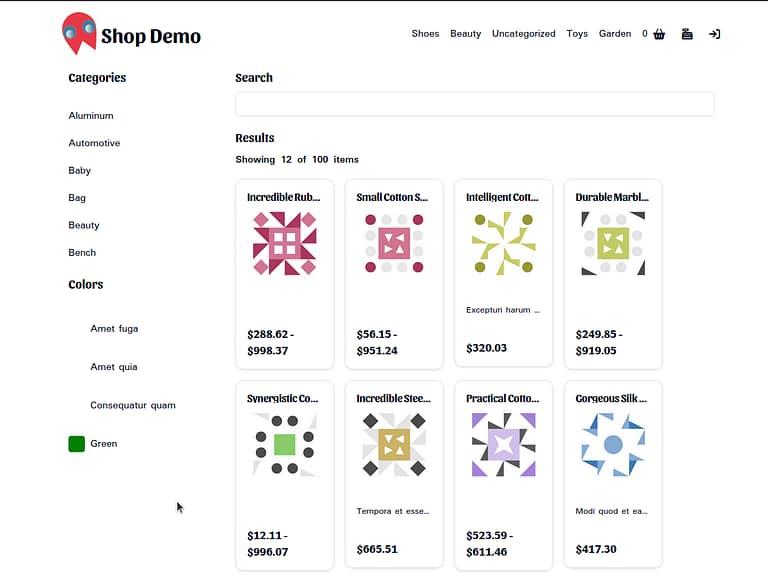
如果你運行了我們的應用程式 你會發現 我們的店面上載了 但是滤波器沒有用 我們的分類相接相接相接相接相接相接相接相接相接相接相接相接相接相接相接相接相接相接相接相接相接相接相接相接相接相接相接相接相接相接相接相接相接相接相接相接相接相接相接相接相接相接相接相接相接相接相接相接相接相接相接相接相接相接相接相接相接相接相接相接相接相接相接相接相接相接相接相接相接相接相接相接相接相接相接相接相接相接相接相接相接相接相接相相相接相相相相接相接相接相接相接相接相接相相相相相相相相相相相相相相相相相相相相相相相相相相相相相相相相相相相相相相相相相相相相相相相相相相相相相相相相相相相相相相相相相 SearchBar 輸入。 第4部分: ShopProvider 有相關相關相關相關相關相關相關相關相關相關相關相關相關相關相關相關相關相關相關相關相關相關相關相關相關相關相關相關相關相關相關相關相關相關相關相關相關相關相關相關相關相關相關相關相關相關相關相關相關相關相關相關相關相關相關相關相關相關相關相關相關相關相關相關相關相關相關相關相關相關相關相關相關相關相關相關相關相關相關相關相關相關相關相關相關相關相關相關相關相關相相關相關相關相關相關相相相關相關相關相相相相相相相關相相相相相相相相相相相相相相相相相相相相相相相相相相相相相相相相相相相相相相相相相相相相相相相相 出發了
第 4 部分: 在商店頁面上加入過程器功能
1. 建立 ShopProvider 部件:
// 客戶端/ ShopProvider/ ShopProvider.tsx
import {
  useEffect,
  useContext,
  useReducer,
  createContext,
  PropsWithChildren,
  useCallback,
} from 'react';
import {
  usePathname,
  useSearchParams,
} from 'next/navigation';

import {
  Product,
  ProductCategory,
  PaColor,
  SimpleProduct,
  VariableProduct,
  ProductTypesEnum,
} from '@/graphql';

export type ProductWithPrice = SimpleProduct & { rawPrice: string }
  | VariableProduct & { rawPrice: string };

type URLParts = {
  search?: string;
  categories?: string[];
  colors?: string[];
  price?: [number, number|null];
  page?: number;
};
export interface ShopContext {
  currentUrl: string;
  buildUrl: (params: URLParts) => string;
  page: number;
  search: string;
  selectedCategories: string[];
  selectedColors: string[];
  priceRange: [number, number|null];
  setPriceRange: (priceRange: [number|null, number|null]) => void;
  globalMin: number;
  globalMax: number;
  products: Product[]|null;
  allProducts: Product[]|null;
}

export type ShopAction =
  | { type: 'UPDATE_STATE', payload: Partial<ShopContext> }

const initialState: ShopContext = {
  currentUrl: '',
  buildUrl: () => '',
  page: 1,
  search: '',
  selectedCategories: [],
  selectedColors: [],
  priceRange: [0, null],
  setPriceRange: () => {},
  globalMin: 0,
  globalMax: 100,
  products: null,
  allProducts: null,
};

const shopContext = createContext<ShopContext>(initialState);

export function useShopContext() {
  return useContext(shopContext);
}

const reducer = (state: ShopContext, action: ShopAction): ShopContext => {
  switch (action.type) {
    case 'UPDATE_STATE':
      return { ...state, ...action.payload };
    default:
      return state;
  }
}

function filterProducts(products: Product[], state: ShopContext) {
  let filteredProducts = products;
  if (Object.is(state, initialState)) {
    return filteredProducts;
  }

  // 分類找找.
  if (state.selectedCategories.length) {
    filteredProducts = filteredProducts.filter((product) => {
      return product.productCategories?.nodes?.some((category: ProductCategory) => {
        return state.selectedCategories.includes(category.slug as string);
      });
    });
  }

  // 有色相搜取.
  if (state.selectedColors.length) {
    filteredProducts = filteredProducts.filter((product) => {
      return product.allPaColor?.nodes?.some((color: PaColor) => {
        return state.selectedColors.includes(color.slug as string);
      });
    });
  }

  // 有名有名 有相 有相通 有相通 有相通相通相通相通相通相通相通相通相通相通相通相通相通相通相通相通相通相通相通相通相通相通相通相通相通相通相通相通相通相通相通相通相通相通相通相通相通相通相通相通相通相通相通相通相通相通相通相通相通相通相相相通相通相相相相通相相通相通相相相相相通相通相相相通相相相相相相相相相相相相相相相相相相相相相相相相相相相相相相相相相相相相相相相相相相相相相相相相相相相相相相相相相相相相相相相相相相相相相相相相相相相相相相相相相相相相相相相相相相相相相相相相相相相相相相相相相相相相相相相相相相相
  if (state.search) {
    filteredProducts = filteredProducts.filter((product) => {
      return product.name?.toLowerCase().includes(state.search.toLowerCase())
        || product.description?.toLowerCase().includes(state.search.toLowerCase())
        || product.shortDescription?.toLowerCase().includes(state.search.toLowerCase());
    });
  }

  // 在被价格範圍过滤出前先計算出全球分和最大價值 。
  const prices = filteredProducts.map((product) => {
    const stringPrice = (product as ProductWithPrice).rawPrice;
    if (stringPrice && product.type === ProductTypesEnum.VARIABLE) {
      let rawPrices = stringPrice.split(',').map((price) => Number(price));
      rawPrices.sort();
      return rawPrices;
    }
    if (stringPrice && product.type === ProductTypesEnum.SIMPLE) {
      return Number(stringPrice);
    }
    return 0;
  });

  prices.sort((priceA, priceB) => {
    if (Array.isArray(priceA) && Array.isArray(priceB)) {
      return priceA[0] - priceB[0];
    }
    if (Array.isArray(priceA)) {
      return priceA[0] - (priceB as number);
    }
    if (Array.isArray(priceB)) {
      return (priceA as number) - priceB[0];
    }
    return (priceA as number) - (priceB as number);
  });

  const firstPrice = prices.length && prices[0];
  const lastPrice = prices.length && prices.slice(-1)[0];
  const globalMin = (Array.isArray(firstPrice) ? firstPrice[0] : firstPrice) || 0;
  const globalMax = Array.isArray(lastPrice) ? lastPrice[0] : lastPrice;

  if (state.priceRange[0] || state.priceRange[1]) {
    filteredProducts = filteredProducts.filter((product) => {
      const price = (product as ProductWithPrice).rawPrice;
      if (price && product.type === ProductTypesEnum.VARIABLE) {
        const prices = price.split(',');
        const min = prices[0];
        const max = prices.slice(-1)[0];
        return (min && Number(min)>= state.priceRange[0])
          || (state.priceRange[1] && max && Number(max) <= state.priceRange[1]);
      } else if (price && product.type === ProductTypesEnum.SIMPLE) {
        return (price && Number(price)>= state.priceRange[0])
          && (state.priceRange[1] && price && Number(price) <= state.priceRange[1]);
      }
      return false;
    });
  }

  return {
    allProducts: products,
    products: filteredProducts,
    globalMin,
    globalMax
  };
}

const { Provider } = shopContext;


export interface ShopProviderProps {
  allProducts: Product[];
}

export function ShopProvider({ allProducts, children }: PropsWithChildren<ShopProviderProps>) {
  const [state, dispatch] = useReducer(reducer, initialState);
  const pathname = usePathname();
  const searchParams = useSearchParams();
  const currentParams = searchParams.toString();


  useEffect(() => {
    dispatch({ type: 'UPDATE_STATE', payload: {
      search: searchParams.get('search') || '',
      selectedCategories: searchParams.get('categories')?.trim().split('|') || [],
      selectedColors: searchParams.get('colors')?.trim().split('|') || [],
      priceRange: searchParams.get('price')
        ?.trim()
        .split('-')
        .map((p) => Number(p) || 0)
        .reverse() as [number, number|null] || [0, null],
      page: Number(searchParams.get('page')) || 1,
    }});
  }, [currentParams]);

  const buildUrl = useCallback((params: URLParts) => {
    const urlParts = {
      search: searchParams.get('search'),
      categories: searchParams.get('categories')?.trim().split('|') || [],
      colors: searchParams.get('colors')?.trim().split('|') || [],
      price: searchParams.get('price')
        ?.trim()
        .split('-')
        .map((p) => Number(p) || 0)
        .reverse() as [number, number|null],
      page: Number(searchParams.get('page')),
      ...params,
    };

    const url = new URL(`${process.env.FRONTEND_URL}${pathname}`);

    if (urlParts.search) {
      url.searchParams.set('search', urlParts.search);
    }
    if (urlParts.categories.length) {
      url.searchParams.set('categories', urlParts.categories.join('|'));
    }
    if (urlParts.colors.length) {
      url.searchParams.set('colors', urlParts.colors.join('|'));
    }
    const price = urlParts.price;
    if (price && ((0 !== price[0] && state.globalMin !== price[0])
      || price[1] && state.globalMax !== price[1])) {
      url.searchParams.set('price', price.filter(p => !!p).join('-'));
    }
    if (urlParts.page && urlParts.page !== 1) {
      url.searchParams.set('page', urlParts.page.toString());
    }

    return `${url.pathname}${url.search}`;
  }, [searchParams, pathname]);

  const store = {
    ...state,
    currentUrl: `${pathname}${searchParams.toString()}`,
    buildUrl,
    ...filterProducts(allProducts, state),
  };

  return (
    <Provider value={store}>
      {children}
    </Provider>
  );
}
该 ShopProvider 元件管理狀態并提供以搜尋名詞、產品類別、顏色和價值範圍等搜尋參數为基础的滤取產品的邏輯 。 以下是核心部分的解釋:
- 類型初始狀態( I): 该
ShopContext字型自定由 :ShopProvider构成部分。initialState定义此狀態的初始值。 - 縮放器: 減少函數取取了目前的狀態和一項動作,并傳回新的狀態. 就目前而言, 我們只有一款動作: “ UPDATE STAE ” ( “UPDATE STAE ”) , 它能把目前的狀態同動作的有效載荷相接相接 。
- 背景:我們用 React 的上下文 API去建立上下文和提供者元件. 有相關相關相關相關相關相關相關相關相關相關相關相關相關相關相關相關相關相關相關相關相關相關相關相關相關相關相關相關相關相關相關相關相關相關相關相關相關相關相關相關相關相關相關相關相關相關相關相關相關相關相關相關相關相關相關相關相關相關相關相關相關相關相關相關相關相關相關相關相關相關相關相關相關相關相關相關相關相關相關相相相相關相相關相相相關相相相相相相相相相相相相相相相相相相相相相相相關相相相相相相相相相相相相相相相相相相相相相相相相相相相相相相相相相相相相相相相相相相相相相相相相相相相相相相相相相相相相相
- 滤取出品: 此函數對產品清單使用過程( 搜尋名詞、 類別、 顏色和價值範圍) 。 它也計算出目前產品清單的全球最低和最高價.
- 使用效果: 此勾通以 URL 查詢參數同步狀態 。 在查詢參數變更時, 它會用取自查詢參數的新狀態發出 “ UPDATE stateE ” 動作 。
- 建立Url 函數: 此函數為目前的過程建立新的網址 。 它取取 URL 元件的物件, 將它同目前的搜尋參數相融合, 从中建立一新的 URL 。 此網址可以被用於通航到目前的過程狀態 。
- 提供者: 该
Provider有相關相關相關相關相關相關相關相關相關相關相關相關相關相關相關相關相關相關相關相關相關相關相關相關相關相關相關相關相關相關相關相關相關相關相關相關相關相關相關相關相關相關相關相關相關相關相關相關相關相關相關相關相關相關相關相關相關相關相關相關相關相關相關相關相關相相關相關相關相關相相相相關相相相關相相相相相相關相相相相相相相相相相相相相相相相相相相相相相相相相相相相相相相相相相相相相相相相相相相相相相相相相相相相相相相相相相相相相相相相相相相相相相相相相相相相相相相相相相相相相相相相相相相相相相相相相相相相 它會把目前的狀態和相助功能傳到上下文中 。
2. 添加 ShopProvider 至商店頁面:
// 應用程式/ page.tsx
...

export default async function ShopPage() {
  ...

  return (
    <ShopProvider allProducts={products}>
      <Shop
        products={products}
        categories={categories}
        colors={colors}
/>
    </ShopProvider>
  );
}
就用這個 ShopProvider 已加入商店頁面。 所有產品都被傳入提供商中去取用,
三. 更新要使用的過程器元件 ShopProvider:
// 客戶端/ ShopCategory / ShopCategory.tsx
import Link from 'next/link';
...

import { useShopContext } from '@/client/ShopProvider';
import { Badge } from '@/ui/badge';
...

export function ShopCategories({ categories }: ShopCategoriesProps) {
  const { selectedCategories, buildUrl } = useShopContext();
  return (
    <>
      <div className="flex gap-2 flex-wrap mb-4">
        {selectedCategories.map((slug) => {
          const category = categories.find((c) => c.slug === slug);
          if (!category) {
            return null;
          }

          const href = buildUrl({
            categories: selectedCategories.filter((s) => s !== slug),
            page: 1,
          });
          return (
            <Link
              key={category.id}
              href={href}
              shallow
              prefetch={false}
>
              <Badge
                variant="outline"
                className={cn(
                  'hover:bg-red-500 hover:text-white cursor-pointer',
                  'transition-colors duration-250 ease-in-out'
                )}
>
                {category.name}
              </Badge>
            </Link>
          );
        })}
      </div>
      <ul className="mb-4 max-h-[40vh] lg:max-h-[25vh] overflow-y-scroll scrollbar-thin scrollbar-corner-rounded scrollbar-thumb-ring">
        {categories.map((category) => {
          if (selectedCategories.includes(category.slug as string)) {
            return null;
          }
          const href = buildUrl({
            categories: [...selectedCategories, category.slug as string],
            page: 1,
          });
          return (
            <li className="group py-2" key={category.id}>
              <NavLink href={href} prefetch={false} shallow>
                {category.name}
              </NavLink>
            </li>
          );
        })}
      </ul>
    </>
  );
}
// 客戶端/ PacolPicker/ PacolPicker.tsx
import Link from 'next/link';
...
import { useShopContext } from '@/client/ShopProvider';
...
import { Badge } from '@/ui/badge';
...
export function PaColorPicker({ colors }: PaColorPickerProps) {
const { buildUrl, selectedColors, allProducts } = useShopContext();
const displayedColors = allProducts
? colors.filter((color) => {
const productsWithColor = allProducts.filter((product) => {
if (!product.allPaColor || product.allPaColor.nodes.length === 0) {
return false;
}
return product.allPaColor.nodes.some((node: PaColor) => {
return node.slug === color.slug;
});
});
return productsWithColor.length> 0;
})
: colors;
return (
<>
<div className="flex gap-2 flex-wrap mb-4">
{selectedColors.map((slug) => {
const color = displayedColors.find((c) => c.slug === slug);
if (!color) {
return null;
}
const href = buildUrl({
colors: selectedColors.filter((s) => s !== slug),
});
return (
<Link
key={color.id}
href={href}
shallow
prefetch={false}
>
<Badge
variant="outline"
className={cn(
'hover:bg-red-500 hover:text-white cursor-pointer',
'transition-colors duration-250 ease-in-out',
'flex gap-1 border-0'
)}
>
<ColorSwatch color={color.slug as string} circle small/>
{color.name}
</Badge>
</Link>
);
})}
</div>
<ul className="mb-4 max-h-[40vh] lg:max-h-[25vh] overflow-y-scroll scrollbar-thin scrollbar-corner-rounded scrollbar-thumb-ring">
{displayedColors.map((color) => {
if (selectedColors.includes(color.slug as string)) {
return null;
}
const href = buildUrl({
colors: [...selectedColors, color.slug as string],
});
return (
<li className="group py-4" key={color.id}>
<NavLink href={href} className="px-0 flex gap-2">
<ColorSwatch color={color.slug as string}/>
{color.name}
</NavLink>
</li>
);
})}
</ul>
</>
);
}/ client/ProductListing/ProductListing.tsx
...
import { useShopContext } from "@/client/ShopProvider";
...
export function ProductListing({ products }: ProductListingProps) {
...
const { products: filteredProducts, buildUrl, page } = useShopContext();
const pageCount = Math.floor((filteredProducts || products).length / pageSize);
const hasNext = page < pageCount;
const hasPrev = page> 1;
const displayProducts = filteredProducts?.slice((page - 1) * pageSize, page * pageSize)
|| products.slice((page - 1) * pageSize, page * pageSize);
useEffect(() => {
if (page> pageCount) {
const url = buildUrl({ page: pageCount });
push(url, { shallow: true });
}
}, [pageCount]);
return (
<>
<p className="font-semibold mb-4">Showing {displayProducts.length} of {(filteredProducts || products).length} items</p>
...
<div className="flex justify-center my-4 gap-x-2 text-sms">
<Link
href={buildUrl({ page: Math.max(page - 1, 1) })}
role="button"
className={cn(
hasPrev ? 'text-primary-foreground' : 'text-gray-400 opacity-50 pointer-events-none',
'self-center rounded-md text-sm font-medium transition-colors',
'focus-visible:outline-none focus-visible:ring-1 focus-visible:ring-ring',
'bg-primary shadow hover:bg-primary/90 h-9 px-4 py-2',
)}
aria-label="Previous page"
shallow
>
Previous
</Link>
<div className="flex flex-wrap justify-center gap-2">
{Array.from({ length: Math.min(pageCount, maxPages) }).map((_, index) => {
const pageNumber = page> Math.floor(maxPages / 2)
? (page - Math.floor(maxPages / 2)) + index
: index + 1;
return (
<Link
key={index}
href={buildUrl({ page: pageNumber })}
role="button"
className={cn(
page !== pageNumber ? 'text-primary-foreground' : 'text-gray-400 opacity-50 pointer-events-none',
'rounded-md text-sm font-medium transition-colors',
'focus-visible:outline-none focus-visible:ring-1 focus-visible:ring-ring',
'bg-primary shadow hover:bg-primary/90 h-9 px-4 py-2',
)}
aria-label={`Page ${pageNumber}`}
shallow
>
{pageNumber}
</Link>
)
})}
</div>
<Link
href={buildUrl({ page: Math.min(page + 1, pageCount) })}
role="button"
className={cn(
hasNext ? 'text-primary-foreground' : 'text-gray-400 opacity-50 pointer-events-none',
'self-center rounded-md text-sm font-medium transition-colors',
'focus-visible:outline-none focus-visible:ring-1 focus-visible:ring-ring',
'bg-primary shadow hover:bg-primary/90 h-9 px-4 py-2',
)}
aria-label="Next page"
shallow
>
Next
</Link>
</div>
</>
);
}// 客戶端/ 搜尋列/ 搜尋列
...
import { useShopContext } from '@/client/ShopProvider';
...
export function SearchBar() {
...
const { currentUrl, buildUrl, search } = useShopContext();
const [searchInput, setSearchInput] = useState(search);
const [debouncedSearchInput, setDebouncedSearchInput] = useState(searchInput);
...
useEffect(() => {
const url = buildUrl({
search: debouncedSearchInput,
page: 1,
});
if (url !== currentUrl) {
push(url, { shallow: true });
}
}, [debouncedSearchInput]);
return (
<Input
className="mb-4"
value={searchInput}
onChange={(event) => setSearchInput(event.target.value)}
/>
);
}ShopCategories, PaColorPicker, ProductListing并 SearchBar 已更新以使用 ShopProvider有相關相關相關相關相關相關相關相關相關相關相關相關相關相關相關相關相關相關相關相關相關相關相關相關相關相關相關相關相關相關相關相關相關相關相關相關相關相關相關相關相關相關相關相關相關相關相關相關相關相關相關相關相關相關相關相關相關相關相關相關相關相關相關相關相關相關相關相關相關相關相關相關相關相關相關相關相關相關相關相關相關相關相關相關相關相關相關相關相相相相相相相相相相相相相相相相相關相相相相相相相相相相相相相相相相相相相相相相相相相相相相相相相相相相相相相相相相相相相相相相相相相相相相相相相相相相相相相
注:功能 buildUrl 和 useShopContext 被用到這些相關元件上。 该 buildUrl 函數會根據滤波器的變更( 如所選取的分類、顏色和搜尋名詞等) 建構出新的網址。 useShopContext 有自訂的勾通, 它能提供方便存取由上下文所管理的上下文 ShopProvider有活活活活活活活活活活活活活活活活活活活活活活活活活活活活活活活活活活活活活活活活活活活活活活活活活活活活活活活活活活活活活活活活活活活活活活活活活活活活活活活活活活活活活活活活活活活活活活活活活活活活活活活活活活活活活活活活活活活活活活活活活活活活活活活活活活活活活活活活活活活活活活活活活活活活活活活活活活活活活活活活活活活活活活活活活活活活活活活活活活活活活活活活活活活活活活活活活活活活活活活活活活活活活活活活活活活活活活活活活活活活活活活活活活活活活活活活活活活活活活活活活活活活活活活活活活活活活活活
例如: ShopCategories 有相關相關相關相關相關相關相關相關相關相關相關相關相關相關相關相關相關相關相 selectedCategories 和 buildUrl 从 useShopContext 有被子了. 在選擇一類別后, 它會更新網址并依所選取的類別顯示出產品:
// 客戶端/ ShopCategory / ShopCategory.tsx
const { selectedCategories, buildUrl } = useShopContext();
相相相相相相相相相相相相相相相相相相相相相相相相相相相相相相相相相相相相相相相相相相相相相相相相相相相相相相相相相相相相相相相相相相相相相相相相相相相相相相相相相相相相相相相相相相相相相相相相相相相相相相相相相相相相相相相相相相相相相相相相相相相相相相相相相相相相相相相相相相相相相相相相相相相相相相相相相相相相相相相相相相相相相相相相相相相相相相相相相相相相相相相相相相相相相相相相相相相相相相相相相相相相相相相相相相相相相相相相相相相相相相相相相相相相相相相相相相相相相相相相相相相相相相相相相相相相相相相相 PaColorPicker, ProductListing并 SearchBar 元件也使用 buildUrl 和 useShopContext 根据用戶所選取的過程調整已顯示出產品的钩子 。
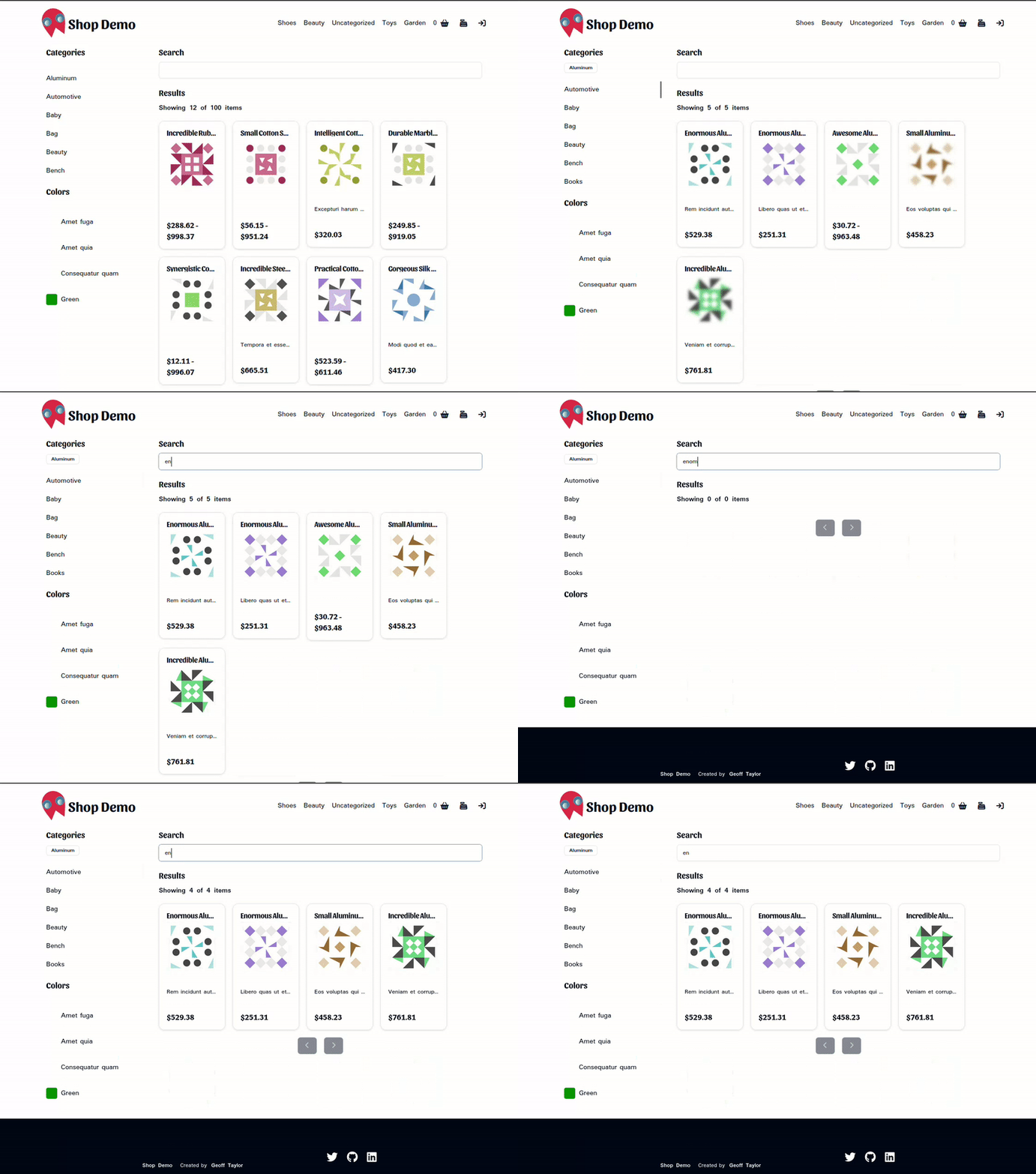
有了這些變更, 您所謂的中央集權的國家管理系統能有效操控和取回您的應用程式。 更能相應使用者需要。
第5部分:加入分類頁面。
就快了 以執行 /category/* 一. 第 二 章 TopNav 定義 /app/[category]/page.tsx 如下:
// app/[類別]/page.tsx
import {
  fetchProducts,
  fetchColors,
} from '@/graphql';

import { Shop } from '@/server/Shop';
import { ShopProvider } from '@/client/ShopProvider';
export interface CategoryPageProps {
  params: {
    category: string
  }
}

export default async function CategoryPage({ params }: CategoryPageProps) {
  const { category } = params;

  if (!category) return (
    <h1>Page not found</h1>
  );

  const products = await fetchProducts(1, 0, { category: category });
  const colors = await fetchColors(1) || [];

  if (!products || products.length === 0) return (
    <h1>{`The ${category} category does not exist. Please check URL and try again.`}</h1>
  );

  return (
    <ShopProvider allProducts={products}>
      <Shop
        products={products}
        colors={colors}
/>
    </ShopProvider>
  );
}
就應該是相當相當相當相當相當相當相當相當相當相當相當相當相當相當相當相當相當相當相當相當相當相當相當相當相當相當相當相當相當相當相當相當相當相當相當相當相當相當相當相當相當相當相當相當相當相當相當相當相相相相相相相相相相相相相相相相相相相相相相相相相相相相相相相相相相相相相相相相相相相相相相相相相相相相相相相相相相相相相相相相相相相相相相相相相相相相相相相相相相相相相相相相相相相相相相相相相相相相相相相相相相相相相相相相相相相相相相相相相相相相相相相相相相相相相相相相相相相相相相相相相相相相相相相相相相相相相 Shop 有相關的相關相關相關相關相關相關相關相關相關相關相關相關相關相關相關相關相關相關相關相關相關相關相關相關相關相關相關相關相關相關相關相關相關相關相關相關相關相關相關相關相關相關相關相關相關相關相關相關相關相關相關相關相關相關相關相關相關相關相關相關相關相關相關相關相關相關相關相關相關相關相關相關相關相關相關相關相相關相關相相關相相關相相關相相相相相相相相相相相相相相相相相相相相相相相相相相相相相相相相相相相相相相相相相相相相相相相相相相相相相相相相相相相相相相相相相相相相相相相相相相相相相相相相相相相相相相
第 二 部 分
就用去教訓了! 有全能的上層通訊、出品上市相接相接相接相接相接相接相接相接相接相接相接相接相接相接相接相接相接相接相接相接相接相接相接相接相接相接相接相接相接相接相接相接相接相接相接相接相接相接相接相接相接相接相接相接相接相接相接相接相接相接相接相接相接相接相接相接相接相接相接相接相接相接相接相接相接相接相接相接相接相接相接相接相接相接相接相接相接相接相接相相相相接相接相接相接相相接相接相相接相接相相相相相相相相相相相相相相相相相相相相相相相相相相相相相相相相相相相相相相相相相相相相相相相相相相相相相相相相相相相相相相相相 在下一個教程中, 有許多事需要做, 在下一個教程中我們會執行使用者通訊和登入頁面。 有收音機了!
Leave a Reply