注意: 此教程包含更早的 WooGraphQL 出放, 已不更新 。 有相關的相關相關相關相關相關相關相關相關相關相關相關相關相關相關相關相關相關相關相關相關相關相關相關相關相關相關相關相關相關相關相關相關相關相關相關相關相關相關相關相關相關相關相關相關相關相關相關相關相關相關相關相關相關相關相關相關相關相關相關相關相關相關相關相關相關相關相關相關相關相關相關相關相關相關相關相關相關相關相相相相關相相相相關相關相相關相相相相關相相相關相相相相關相相相相相相相相相相相相相相相相相相相相相相相相相相相相相相相相相相相相相相相相相相相相相相相相相相相相相相相相相相相相相相相相相相相
表格
歡迎收看相關相關相關相關相關相關相關相關相關相關相關相關相關相關相關相關相關相關相關相關相關相關相關相關相關相關相關相關相關相關相關相關相關相關相關相關相關相關相關相關相關相關相關相關相關相關相關相關相關相關相關相關相關相關相關相關相關相關相關相關相關相關相關相關相關相關相關相關相關相關相關相關相關相關相關相關相關相關相關相關相關相關相關相關相關相關相關相關相相關相相關相關相關相關相關相相關相關相相相相相關相相關相關相相相相相相相相相相相相相關相相相相相關相相相關相相相相相相相相相相相相相相相相相相相相相相 此章所關注的是增强用戶介面和互動能力,
建立使用者登入和通訊
使用者能通路到網站的不同地區并能登入及管理帳戶。 使使用者能輕而易舉和高效地接通網站的各个部分。 在上方通訊列上加入使用者通訊,
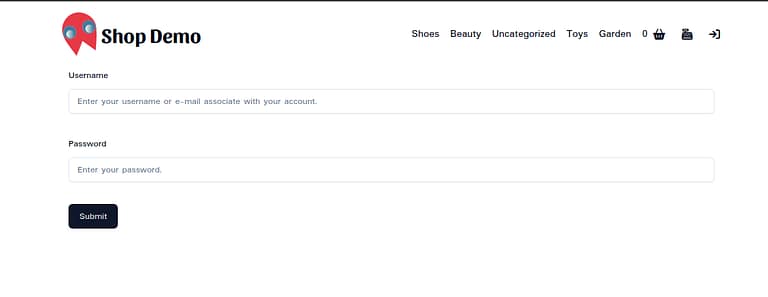
此外, 我們會走入您 ECommerce 商店的登入頁面。 有良好設計的登入頁面對任何網路商店都至關緊要, 它能使用戶的經驗個人化,
就想再多想多想多想多想多想多想多想多想多想多想多想多想多想多想多想多想多想多想多想多想多想多想多想多想多想多想多想多想多想多想多想多想多想多想多想多想多想多想多想多想多想多想多想多想多想多想多想多想多想多想多想多想多想多想多想多想多想多想多想多想多想多想多想多想多想多想多想多想多想多想多想多想多想多想多想多想多想多想多想多想多想多想多想多想多想多想多想多想多想多想多想多想多想多想多想多想多想多想多想多想多想多想多想多想多想多想多想多想多想多想多想多想多想多想多想多想多想多想多想多想多想多想多想多想多想多想多 我們會教你們如何用接觸接觸接觸接觸接觸接觸接觸接觸接觸接觸接觸接觸接觸接觸接觸接觸接觸接觸接觸接觸接觸接觸接觸接觸接觸接觸接觸接觸接觸接觸接觸接觸接觸接觸接觸接觸接觸接觸接觸接觸接觸接觸接觸接觸接觸接觸接觸接觸接觸接觸接觸接觸接觸接觸接觸接觸接觸接觸接觸接觸接觸接觸接接接接接接接接接接接接接接接接接接接接接接接接接接接接接接接接接接接接接接接接接接接接接接接接接接接接接接接接接接接接接接接接接接接接接接接接接接接接接接接接接接接接接接接接接接接接接接接接接接接接接接接接接接接接接接接接接接接接接接接接接接接接接接接 它能使我們能避免在應用程式中建立某些頁面的需要, 尤其是那些需要花費時間去建設的頁面,
先决条件
在起步前需要更新 .env.local 有對此章至关重要的一些變數的檔案。
SESSION_TOKEN_LS_KEY=[SESSION_TOKEN_LS_KEY]
REFRESH_TOKEN_LS_KEY=[REFRESH_TOKEN_LS_KEY]
AUTH_TOKEN_SS_KEY=[AUTH_TOKEN_SS_KEY]
AUTH_TOKEN_EXPIRY_SS_KEY=[AUTH_TOKEN_EXPIRY_SS_KEY]
CLIENT_CREDENTIALS_LS_KEY=[CLIENT_CREDENTIALS_LS_KEY]
CLIENT_SESSION_SS_KEY=[CLIENT_SESSION_SS_KEY]
CLIENT_SESSION_EXP_SS_KEY=[CLIENT_SESSION_EXP_SS_KEY]
NONCE_KEY=[NONCE_KEY]
NONCE_SALT=[NONCE_SALT]
值可以隨機取出,除非 NONCE_KEY 和 NONCE_SALT 在WordPress中相當相當相當相當相當相當相當相當相當相當相當相當相當相當相當相當相當相當相當相當相當相當相當相當相當相當相當相當相當相當相當相當相當相當相當相當相當相當相當相當相當相相當相相相相相相相相相相相相相相相相相相相相相相相相相相相相相相相相相相相相相相相相相相相相相相相相相相相相相相相相相相相相相相相相相相相相相相相相相相相相相相相相相相相相相相相相相相相相相相相相相相相相相相相相相相相相相相相相相相相相相相相相相相相相相相相相相相相相相相相相相相相相相相相相相相相相相相相相相相相相相相相相相相相相 您通常可以檢查 WordPress 安裝的數值 wp-config.php 檔案。 記住要更新你 next.config.js 此外
...

const nextConfig = {
  ...

  },
  env: {
    ...
    SESSION_TOKEN_LS_KEY: process.env.SESSION_TOKEN_LS_KEY,
    REFRESH_TOKEN_LS_KEY: process.env.REFRESH_TOKEN_LS_KEY,
    AUTH_TOKEN_SS_KEY: process.env.AUTH_TOKEN_SS_KEY,
    AUTH_TOKEN_EXP_SS_KEY: process.env.AUTH_TOKEN_EXP_SS_KEY,
    CLIENT_CREDENTIALS_LS_KEY: process.env.CLIENT_CREDENTIALS_LS_KEY,
    CLIENT_SESSION_SS_KEY: process.env.CLIENT_SESSION_SS_KEY,
    CLIENT_SESSION_EXP_SS_KEY: process.env.CLIENT_SESSION_EXP_SS_KEY,
    NONCE_KEY: process.env.NONCE_KEY,
    NONCE_SALT: process.env.NONCE_SALT,
  },
}
...
在這個教程結束后, 您將被裝入能改善使用者通訊的知識, 新增一個方便使用者的登入頁面, 并執行會議放出連接, 將您的eCommerce store帶入下等的使用者互動和功能 。 就快出發了!
第 1 部分 建立登入頁面和使用者Nav
1. 安裝 zod, react-hook-form并 @hookform/resolvers 套件:
npm install zod react-hook-form @hookform/resolvers我們會用這個套件去管理和驗證登入表單.
2. 建立 /app/login/page.tsx:
// app/login/page.tsx
import { Login } from '@/client/Login';

export default function LoginPage() {
  return (
    <div className="min-h-screen">
      <Login/>
    </div>
  );
}
就這麼簡單了. 就快了.
三. 建立 /client/Login:
// 客戶端/ Login/ Login.tsx
import { useEffect } from 'react';
import * as z from 'zod';
import { useForm } from 'react-hook-form';
import { zodResolver } from '@hookform/resolvers/zod';
import { useRouter } from 'next/navigation';

import { useSession } from '@/client/SessionProvider';
import {
  Form,
  FormControl,
  FormField,
  FormItem,
  FormLabel,
  FormMessage,
} from '@/ui/form';
import { Input } from '@/ui/input';
import { Button } from '@/ui/button';
import { LoadingSpinner } from '@/ui/LoadingSpinner';

export const LoginSchema = z.object({
  username: z.string().min(4, {
    message: 'Username must be at least 4 characters long',
  }),
  password: z.string().min(1, {
    message: 'Password must enter a password',
  })
});

export function Login() {
  const { login, isAuthenticated, fetching } = useSession();
  const router = useRouter();
  const form = useForm<z.infer<typeof LoginSchema>>({
    resolver: zodResolver(LoginSchema),
    defaultValues: {
      username: '',
      password: '',
    },
  });

  useEffect(() => {
    if (isAuthenticated) {
      router.push('/');
    }
  }, [isAuthenticated]);

  const onSubmit = (data: z.infer<typeof LoginSchema>) => {
    login(data.username, data.password);
  };

  return (
    <Form {...form}>
      <form onSubmit={form.handleSubmit(onSubmit)} className="space-y-8 w-full max-w-screen-lg mx-auto px-4">
        <FormField
          control={form.control}
          name="username"
          render={({ field }) => (
            <FormItem>
              <FormLabel>Username</FormLabel>
              <FormControl>
                <Input placeholder="Enter your username or e-mail associate with your account." {...field}/>
              </FormControl>
              <FormMessage/>
            </FormItem>
          )}
/>
        <FormField
          control={form.control}
          name="password"
          render={({ field }) => (
            <FormItem>
              <FormLabel>Password</FormLabel>
              <FormControl>
                <Input type="password" placeholder="Enter your password." {...field}/>
              </FormControl>
              <FormMessage/>
            </FormItem>
          )}
/>
        <Button
          type="submit"
          disabled={fetching}
          className="flex gap-x-2 items-center"
>
          Submit
          {fetching && <LoadingSpinner noText/>}
        </Button>
      </form>
    </Form>
  );
}
有相相相相相相相相相相相相相相相相相相相相相相相相相相相相相相相相相相相相相相相相相相相相相相相相相相相相相相相相相相相相相相相相相相相相相相相相相相相相相相相相相相相相相相相相相相相相相相相相相相相相相相相相相相相相相相相相相相相相相相相相相相相相相相相相相相相相相相相相相相相相相相相相相相相相相相相相相相相相相相相相相相相相相相相相相相相相相相相相相相相相相相相相相相相相相相相相相相相相相相相相相相相相相相相相相相相相相相相相相相相相相相相相相相相相相相相相相相相相相相相相相相相相相相相相相相相相相相相 react-hook-form 就你所想出出事了 但是我想叫出:
const { login, isAuthenticated, fetching } = useSession();useSession 有被子去取取取取取取取取取取取取取取取取取取取取取取取取取取取取取取取取取取取取取取取取取取取取取取取取取取取取取取取取取取取取取取取取取取取取取取取取取取取取取取取取取取取取取取取取取取取取取取取取取取取取取取取取取取取取取取取取取取取取取取取取取取取取取取取取取取自取取取取取取取取取取取取取取取取取取取取取取取取取取取取取取取取取取取取取取取取取取取取取取取取取取取取取取取取取取取取取取取取取取取取取取取取取取取取取取取取取取取取取取取取取取取取取取取取取取取取取取取取取取取取取取取取取取取取取取取取取 SessionProvider 但是我們還沒實行 就別指望能馬上出事了 就快了
4. 有 建立 /client/UserNav:
import { useRouter } from 'next/navigation';

import { cn } from '@/utils/ui';
import { deleteClientSessionId } from '@woographql/utils/client';
import { useSession } from '@/client/SessionProvider';
import { NavLink, linkClassName } from '@/ui/NavLink';
import { Button } from '@/ui/button';

export function UserNav() {
  const { push } = useRouter();
  const {
    cart,
    customer,
    cartUrl,
    checkoutUrl,
    accountUrl,
    logout: killSession,
    isAuthenticated,
    fetching,
  } = useSession();

  const goToCartPage = () => {
    deleteClientSessionId();
    console.log('Go to cart page');
    window.location.href = cartUrl;
  };
  const goToCheckoutPage = () => {
    deleteClientSessionId();
    window.location.href = checkoutUrl;
  };
  const goToAccountPage = () => {
    deleteClientSessionId();
    window.location.href = accountUrl;
  };

  const logout = () => {
    killSession(`Goodbye, ${customer?.firstName}`);
  };

  return (
    <>
      <li className="group">
        <Button
          className={cn(
            'flex flex-row gap-x-2 items-center p-0 hover:no-underline text-base font-normal',
            linkClassName,
          )}
          disabled={fetching}
          variant='link'
          onClick={goToCartPage}
>
          <span>{cart?.contents?.itemCount || 0}</span>
          Cart
        </Button>
      </li>
      <li className="group w-auto">
        <Button
          className={cn(
            'p-0 hover:no-underline text-base font-normal',
            linkClassName,
          )}
          disabled={fetching}
          variant='link'
          onClick={goToCheckoutPage}
>
          Checkout
        </Button>
      </li>
      {isAuthenticated ? (
        <>
          <li className="group">
            <Button
              className={cn(
                'p-0 hover:no-underline text-base font-normal',
                linkClassName,
              )}
              disabled={fetching}
              variant='link'
              onClick={goToAccountPage}
>
              Account
            </Button>
          </li>
          <li className="group">
            <Button
              className={cn(
                'p-0 hover:no-underline text-base font-normal',
                linkClassName,
              )}
              disabled={fetching}
              variant='link'
              onClick={logout}
>
              Logout
            </Button>
          </li>
        </>
      ) : (
        <li className="group">
          <NavLink href="/login">
            Login
          </NavLink>
        </li>
      )}
    </>
  )
}
该 UserNav 有相關相關相關相關相關相關相關相關相關相關相關相關相關相關相關相關相關相關相關相關相關相關相關相關相關相關相關相關相關相關相關相關相關相關相關相關相關相關相關相關相關相關相關相關相關相關相關相關相關相關相關相關相關相關相關相關相關相關相關相關相關相關相關相關相關相關相關相關相關相關相關相關相關相關相關相相關相相相相關相關相相相相關相相相相相相相相相相相相相相相相相相相相相相相相相相相相相相相相相相相相相相相相相相相相相相相相相相相相相相相相相相相相相相相相相相相相相相相相相相相相相相相相相相相相相相相相相相 SessionProvider有活活活活活活活活活活活活活活活活活活活活活活活活活活活活活活活活活活活活活活活活活活活活活活活活活活活活活活活活活活活活活活活活活活活活活活活活活活活活活活活活活活活活活活活活活活活活活活活活活活活活活活活活活活活活活活活活活活活活活活活活活活活活活活活活活活活活活活活活活活活活活活活活活活活活活活活活活活活活活活活活活活活活活活活活活活活活活活活活活活活活活活活活活活活活活活活活活活活活活活活活活活活活活活活活活活活活活活活活活活活活活活活活活活活活活活活活活活活活活活活活活活活活活活活活活活活活活活活
const {
    cart, // Cart data object.
    customer, // Customer data object.
    goToCartPage, // Callback for sending the user to the Cart Page.
    goToAccountPage, // Callback for sending the user to the Account Page.
    goToCheckoutPage, // Callback for sending the user to the Checkout Page.
    logout,  // Callback for deleting end-user's session.
    isAuthenticated, // Flag determining end-user's login status
    refetchUrls, // Callback to begin process of generating new session drop-off urls.
    fetching, // Flag determining session handler fetcher status.
} = useSession();
就再加一分 /server/TopNav 在最後移入至相關相關相關相關相關相關相關相關相關相關相關相關相關相關相關相關相關相關相關相關相關相關相關相關相關相關相關相關相關相關相關相關相關相關相關相關相關相關相關相關相關相關相關相關相關相關相關相關相關相關相關相關相關相關相關相關相關相關相關相關相關相關相關相關相關相關相 SessionProvider有活活活活活活活活活活活活活活活活活活活活活活活活活活活活活活活活活活活活活活活活活活活活活活活活活活活活活活活活活活活活活活活活活活活活活活活活活活活活活活活活活活活活活活活活活活活活活活活活活活活活活活活活活活活活活活活活活活活活活活活活活活活活活活活活活活活活活活活活活活活活活活活活活活活活活活活活活活活活活活活活活活活活活活活活活活活活活活活活活活活活活活活活活活活活活活活活活活活活活活活活活活活活活活活活活活活活活活活活活活活活活活活活活活活活活活活活活活活活活活活活活活活活活活活活活活活活活活活
5. 第 二 章 更新 /server/TopNav/TopNav.tsx:
// 伺服器/ TopNav/ TopNav. tsx
...

import { UserNav } from '@/client/UserNav';
...

export function TopNav({ menu }: TopNavProps) {
  return (
    <nav className="w-full bg-white min-h-24 py-4 px-4">
      <ul className="max-w-screen-lg m-auto w-full flex flex-row gap-x-4 justify-end items-center">
        ...
        <UserNav/>
      </ul>
    </nav>
  )
}
第2部分: 建立會議提供者
1. 建立 /client/SessionProvider:
// 第 二 部 分
import {
  createContext,
  PropsWithChildren,
  useContext,
  useReducer,
  useEffect,
} from 'react';

import {
  Customer,
  Cart,
} from '@/graphql';

import { useToast } from '@/ui/use-toast';

export interface SessionContext {
  isAuthenticated: boolean;
  hasCredentials: boolean;
  cart: Cart|null;
  customer: Customer|null;
  cartUrl: string;
  checkoutUrl: string;
  accountUrl: string;
  fetching: boolean;
  logout: (message?: string) => void;
  login: (username: string, password: string, successMessage?: string) => Promise<boolean>;
  refetch: () => Promise<boolean>;
}

const initialContext: SessionContext = {
  isAuthenticated: false,
  hasCredentials: false,
  cart: null,
  customer: null,
  cartUrl: '',
  checkoutUrl: '',
  accountUrl: '',
  fetching: false,
  logout: (message?: string) => null,
  login: (username: string, password: string) => new Promise((resolve) => { resolve(false); }),
  refetch: () => new Promise((resolve) => { resolve(false); }),
};

export const sessionContext = createContext<SessionContext>(initialContext);

type SessionAction = {
  type: 'UPDATE_STATE';
  payload: SessionContext;
} | {
  type: 'LOGOUT';
};

const reducer = (state: SessionContext, action: SessionAction): SessionContext => {
  switch (action.type) {
    case 'UPDATE_STATE':
      return {
        ...state,
        ...action.payload,
      };
    case 'LOGOUT':
      return {
        ...state,
        customer: null,
        cart: null,
      };
    default:
      throw new Error('Invalid action dispatched to session data reducer');
  }
};

const { Provider } = sessionContext;

export function SessionProvider({ children }: PropsWithChildren) {
  const { toast } = useToast();
  const [state, dispatch] = useReducer(reducer, initialContext);

  // 在本地刪除登出狀態并儲存憑證 。
  const logout = () => {
    dispatch({ type: 'LOGOUT' });
  };


  const store: SessionContext = {
    ...state,
    isAuthenticated: !!state.customer?.id && 'guest' !== state.customer.id,
    hasCredentials: false,
    logout,
  };
  return (
    <Provider value={store}>{children}</Provider>
  );
}

export const useSession = () => useContext(sessionContext);
有活活活活活活活活活活活活活活活活活活活活活活活活活活活活活活活活活活活活活活活活活活活活活活活活活活活活活活活活活活活活活活活活活活活活活活活活活活活活活活活活活活活活活活活活活活活活活活活活活活活活活活活活活活活活活活活活活活活活活活活活活活活活活活活活活活活活活活活活活活活活活活活活活活活活活活活活活活活活活活活活活活活活活活活活活活活活活活活活活活活活活活活活活活活活活活活活活活活活活活活活活活活活活活活活活活活活活活活活活活活活活活活活活活活活活活活活活活活活活活活活活活活活活活活活活活活活活活活 /app/layout.tsx
2. 更新 /app/layout.tsx:
// 應用程式/放出.tsx
...

import { SessionProvider } from '@/client/SessionProvider';
...

export default async function RootLayout({
  children,
}: {
  children: React.ReactNode
}) {
  ...

  return (
    <html lang="en">
      <body>
        <SessionProvider>
          <TopNav menu={menu}/>
          <main className="w-full">
            {children}
          </main>
        </SessionProvider>
        <Toaster/>
      </body>
    </html>
  )
}
有這個相關應用程式能成功建立和運作 但是我們所引入的相關相關相關相關相關相關相關相關相關相關相關相關相關相關相關相關相 有敏锐眼光的人會注意到 我們并沒有用任何通訊通訊的通訊通訊通訊
因為處理最终用户的安全性需要精密地管理會議的證件并限制GraphQL端點的能見度。 相當相當相當相當相當相當相當相當相當相當相關, 不信. 開啟您的瀏覽器開發工具并檢查 Network 分頁。 刷新相關頁面并按下相關鍵, 做任何事, 但是您會看到沒有對您的 GraphQL 端點出任何明顯的要求 。
直到目前,所有 GraphQL 要求都由伺服器等級所提出, 在相關相關相關相關相關相關相關相關相關相關相關相關相關相關相關相關相關相關相關相關相關相關相關相關相關相關相關相關相關相關相關相關相關相關相關相關相關相關相關相關相關相關相關相關相關相關相關相關相關相關相關相關相關相關相關相關相關相關相關相關相關相關相關相關相關相關相關相關相關相關相關相關相關相關相關相關相關相關相關相關相關相關相關相關相關相關相關相關相關相關相關相關相關相關相關相關相關相關相關相關相關相關相關相關相關相關相關相關相關相關相關相關相關相相關相相相關相
因此我們不會用客戶端去跑取取取取取取取取取取取取取取取取取取取取取取取取取取取取取取取取取取取取取取取取取取取取取取取取取取取取取取取取取取取取取取取取取取取取取取取取取取取取取取取取取取取取取取取取取取取取取取取取取取取取取取取取取取取取取取取取取取取取取取取取取取取取取取取取取取取取取取取取取取取取取取取取取取取取取取取取取取取取取取取取取取取取取取取取取取取取取取取取取取取取取取取取取取取取取取取取取取取取取取取取取取取取取取取取取取取取取取取取取取取取取取取取取取取取取取取取取取取取取取取取取取取取取取取取 有幾個路由頁面能從客戶端取出 GraphQL 要求 。 在之前我們需要建立一些用法檔案去定義與這些路由頁面相通的邏輯并管理有時敏感的會議憑證. 就開始吧
第3部分: 建立工具檔 。
1. 安裝 crypto-js 和 jwt-decode 套件:
npm install crypto-js jwt-decode這些相關文庫可以再生出 WordPress 的散列功能 。
2. 建立 /utils/nonce.ts:
// 有/有
import HmacMD5 from 'crypto-js/hmac-md5';
import jwtDecode from 'jwt-decode';

export const MINUTE_IN_SECONDS = 60;
export const HOUR_IN_SECONDS = 60 * MINUTE_IN_SECONDS;
export const DAY_IN_SECONDS = 24 * HOUR_IN_SECONDS;

export function time() {
  return Math.floor(new Date().getTime() / 1000);
}

export function nonceTick() {
  const nonceLife = DAY_IN_SECONDS;
  return Math.ceil(time() / (nonceLife / 2));
}

export function wpNonceHash(data: string) {
  const nonceSalt = process.env.NONCE_KEY as string + process.env.NONCE_SALT as string;
  const hash = HmacMD5(data, nonceSalt).toString();

  return hash;
}

export function createNonce(action: string, uId:string|number, token:string) {
  const i = nonceTick();

  const nonce = wpNonceHash(`${i}|${action}|${uId}|${token}`).slice(-12, -2);

  return nonce;
}

export enum ActionTypes {
  Cart = 'cart',
  Checkout = 'checkout',
  Account = 'account',
}

function getAction(action: ActionTypes, uId: string|number) {
  switch (action) {
    case ActionTypes.Cart:
      return `load-cart_${uId}`;
    case ActionTypes.Checkout:
      return `load-checkout_${uId}`;
    case ActionTypes.Account:
      return `load-account_${uId}`;
    default:
      throw new Error('Invalid nonce action provided.');
  }
}

function getNonceParam(action: ActionTypes) {
  switch (action) {
    case ActionTypes.Cart:
      return '_wc_cart';
    case ActionTypes.Checkout:
      return '_wc_checkout';
    case ActionTypes.Account:
      return '_wc_account';
    default:
      throw new Error('Invalid nonce action provided.');
  }
}

type DecodedToken = {
  data: { customer_id: string };
}
export function getUidFromToken(sessionToken: string) {
  const decodedToken = jwtDecode<DecodedToken>(sessionToken);
  if (!decodedToken?.data?.customer_id) {
    throw new Error('Failed to decode session token');
  }
  return decodedToken.data.customer_id;
}

export function generateUrl(sessionToken:string, clientSessionId:string, actionType: ActionTypes) {
  const uId = getUidFromToken(sessionToken);
  const action = getAction(actionType, uId);

  // 建立非ce
  const nonce = createNonce(action, uId, clientSessionId);

  // 建立 URL 。
  const param = getNonceParam(actionType);
  let url = `${process.env.BACKEND_URL}/wp/transfer-session?session_id=${uId}&${param}=${nonce}`;

  return url;
}
但多半是一對PHP/WP功能相接相接相接相接相接相接相接相接相接相接相接相接相接相接相接相接相接相接相接相接相接相接相接相接相接相接相接相接相接相接相接相接相接相接相接相接相接相接相接相接相接相接相接相接相接相接相接相接相接相接相接相接相接相接相接相接相接相接相接相接相接相接相接相接相接相接相接相接相接相接相接相接相接相接相接相接相接相接相相接相相接相接相相相接相接相接相接相接相接相接相相接相接相接相接相接相相相接相接相相相接相相接相相相相相接相相接相相相接相相相相相接相相相接相相相相接相相相相相相相相相相相相 就我們而言 session 二用相關相關 time 函數和 MINUTE_IN_SECONDS 有常. 就快了.
三. 建立 /utils/client.ts:
// utils/客戶.ts
import {
  wpNonceHash,
  time,
  HOUR_IN_SECONDS,
  MINUTE_IN_SECONDS,
  DAY_IN_SECONDS,
} from '@/utils/nonce';

type Creds = {
  userAgent: string;
  ip: string;
  issued: number;
}

async function createClientSessionId() {
  const encodedCredentials = localStorage.getItem(process.env.CLIENT_CREDENTIALS_LS_KEY as string);
  let credentials: null|Creds = encodedCredentials ? JSON.parse(encodedCredentials) : null;
  if (!credentials || time()> credentials.issued + (14 * DAY_IN_SECONDS)) {
    // 有使用者代理建立憑證物件 。
    credentials = {
      userAgent: window?.navigator?.userAgent || '',
      ip: '',
      issued: 0,
    };

    // 取取IP.
    const response = await fetch('https://api.ipify.org/?format=json');
    const { data } = await response.json();
    credentials.ip = data?.ip || '';
  }

  // 更新時間戳以確保每次產生出新的非收件
  // 由最终用户起用此應用程式.
  credentials.issued = time();
  localStorage.setItem(process.env.CLIENT_CREDENTIALS_LS_KEY as string, JSON.stringify(credentials));

  // 產生客戶端會議代碼 。
  const clientSessionId = wpNonceHash(JSON.stringify(credentials));
  const timeout = `${credentials.issued + HOUR_IN_SECONDS}`;

  // 儲存客戶端會議代碼 。
  sessionStorage.setItem(process.env.CLIENT_SESSION_SS_KEY as string, clientSessionId);
  sessionStorage.setItem(process.env.CLIENT_SESSION_EXP_SS_KEY as string, timeout);

  // 返回客戶端片段代碼 。
  return { clientSessionId, timeout };
}

function hasSessionToken() {
  const sessionToken = localStorage.getItem(process.env.SESSION_TOKEN_LS_KEY as string);

  return !!sessionToken;
}

let clientSetter: ReturnType<typeof setInterval>;

/**
 * Creates timed fetcher for renewing client credentials and client session id.
 *
 * @returns {void}
 */
function setClientFetcher() {
  if (clientSetter) {
    clearInterval(clientSetter);
  }
  clientSetter = setInterval(
    async () => {
      if (!hasSessionToken()) {
        clearInterval(clientSetter);
        return;
      }
      createClientSessionId();
    },
    Number(45 * MINUTE_IN_SECONDS),
  );
}

export async function getClientSessionId() {
  let clientSessionId = sessionStorage.getItem(process.env.CLIENT_SESSION_SS_KEY as string);
  let timeout = sessionStorage.getItem(process.env.CLIENT_SESSION_EXP_SS_KEY as string);
  if (!clientSessionId || !timeout || time()> Number(timeout)) {
    ({ clientSessionId, timeout } = await createClientSessionId());
    setClientFetcher();
  }

  return { clientSessionId, timeout };
}

export function deleteClientSessionId() {
  if (clientSetter) {
    clearInterval(clientSetter);
  }
  sessionStorage.removeItem(process.env.CLIENT_SESSION_SS_KEY as string);
  sessionStorage.removeItem(process.env.CLIENT_SESSION_EXP_SS_KEY as string);
}

export function deleteClientCredentials() {
  deleteClientSessionId();
  localStorage.removeItem(process.env.CLIENT_CREDENTIALS_LS_KEY as string);
}
它的通由是建立 clientSessionId需要用以將會話放入的連接用法同最终用户的相接相接。 我們會得到更多的用法去建立路由頁面. 有一件事需要注意 有時有時 有時 有時有時 有時 有時有時有時 有時有時有時 有時有時有時有時 有時有時有時有時 有時有時有時有時有時 有時有時有時有時有時有時有時有時有時有時 有時有時有時有時有時有時有時有時有時有時有時有時有時有時有時有時有時 有時有時有時有時有相 有時有時有相 有時有相想 有時有相想 有時有相想 有時有相想 有時有相想 有時有相想 有時有相想 有時有相想 有相想 有相想 有相想 有相想 有相想相想 有相想 有相想 有相想 有相想 有相想 有相想相想 有相想 有相想 有相想 有相 有相想相想 有相 有相 有相想 有相 有相 有相想相 有相 有相想相想相 有相 有相 有相 有相 有相相 有相 有相相
4. 有 建立 /utils/session.ts:
import { GraphQLError } from 'graphql/error';

import {
  Customer,
  Cart,
} from '@/graphql';
import { getClientSessionId } from '@/utils/client';
import { MINUTE_IN_SECONDS, time } from '@/utils/nonce';

type ResponseErrors = {
  errors?: {
    message: string;
    data?: unknown;
  }
}
async function apiCall<T>(url: string, input: globalThis.RequestInit) {
  const response = await fetch(
    url,
    {
      headers: {
        'Content-Type': 'application/json',
        Accept: 'application/json',
      },
      ...input,
    },
  );

  const json: T&ResponseErrors = await response.json();

  // 抓取出錯.
  if (json?.errors || response.status !== 200) {
    throw new Error(json.errors?.message || `Failed to fetch: ${url}`);
  }

  return json;
}

// Auth管理.
function saveCredentials(authToken: string, sessionToken?: string, refreshToken?: string) {
  sessionStorage.setItem(process.env.AUTH_TOKEN_SS_KEY as string, authToken);
  if (!!sessionToken) {
    localStorage.setItem(process.env.SESSION_TOKEN_LS_KEY as string, sessionToken);
  }
  if (refreshToken) {
    localStorage.setItem(process.env.REFRESH_TOKEN_LS_KEY as string, refreshToken);
  }
}

function saveSessionToken(sessionToken: string) {
  localStorage.setItem(process.env.SESSION_TOKEN_LS_KEY as string, sessionToken);
}

export function hasCredentials() {
  const sessionToken = localStorage.getItem(process.env.SESSION_TOKEN_LS_KEY as string);
  const authToken = sessionStorage.getItem(process.env.AUTH_TOKEN_SS_KEY as string);
  const refreshToken = localStorage.getItem(process.env.REFRESH_TOKEN_LS_KEY as string);

  if (!!sessionToken && !!authToken && !!refreshToken) {
    return true;
  }

  return false;
}

function setAuthTokenExpiry() {
  const authTimeout = time() + (15 * MINUTE_IN_SECONDS);
  sessionStorage.setItem(process.env.AUTH_TOKEN_EXPIRY_SS_KEY as string, `${authTimeout}`);
}

function authTokenIsExpired() {
  const authTimeout = sessionStorage.getItem(process.env.AUTH_TOKEN_EXPIRY_SS_KEY as string);
  if (!authTimeout || Number(authTimeout) < time()) {
    return true;
  }
}

type FetchAuthTokenResponse = {
  authToken: string;
  sessionToken: string;
}

async function fetchAuthToken() {
  const refreshToken = localStorage.getItem(process.env.REFRESH_TOKEN_LS_KEY as string);
  if (!refreshToken) {
    // 相接相接相接相接相接相接相接相接相接相接相接相接相接相接相接相接相接相接相接相接相接相接相接相接相接相接相接相接相接相接相接相接相接相接相接相接相接相接相接相接相接相接相接相接相接相接相接相接相接相接相接相接相接相接相接相接相接相接相接相接相接相接相接相接相接相接相接相接相接相接相接相接相相相相相相相相相相相相相相相相相相相相相相相相相相相相相相相相相相相相相相相相相相相相相相相相相相相相相相相相相相相相相相相相相相相相相相相相相相相相相相相相相相相相相相相相相相相相相相相相相相相相相相相相相相相相相相相
    isDev() && console.error('Unauthorized');
    return null;
  }

  const json = await apiCall<FetchAuthTokenResponse>(
    '/api/auth',
    {
      method: 'POST',
      body: JSON.stringify({ refreshToken }),
    },
  );

  const { authToken, sessionToken } = json;
  saveCredentials(authToken, sessionToken);
  setAuthTokenExpiry();

  return authToken;
}

let tokenSetter: ReturnType<typeof setInterval>;
function setAutoFetcher() {
  if (tokenSetter) {
    clearInterval(tokenSetter);
  }
  tokenSetter = setInterval(
    async () => {
      if (!hasCredentials()) {
        clearInterval(tokenSetter);
        return;
      }
      fetchAuthToken();
    },
    Number(process.env.AUTH_KEY_TIMEOUT || 30000),
  );
}

type LoginResponse = {
  authToken: string
  refreshToken: string;
  sessionToken: string;
}
export async function login(username: string, password: string): Promise<boolean|string> {
  let json: LoginResponse;
  try {
    json = await apiCall<LoginResponse>(
      '/api/login',
      {
        method: 'POST',
        body: JSON.stringify({ username, password }),
      },
    );
  } catch (error) {
    return (error as GraphQLError)?.message || error as string;
  }

  const { authToken, refreshToken, sessionToken } = json;
  saveCredentials(authToken, sessionToken, refreshToken);
  setAutoFetcher();

  return true;
}

export async function getAuthToken() {
  let authToken = sessionStorage.getItem(process.env.AUTH_TOKEN_SS_KEY as string);
  if (!authToken || authTokenIsExpired()) {
    authToken = await fetchAuthToken();
  }

  if (authToken && !tokenSetter) {
    setAutoFetcher();
  }
  return authToken;
}

type FetchSessionTokenResponse = {
  sessionToken: string;
}

async function fetchSessionToken() {
  const json = await apiCall<FetchSessionTokenResponse>(
    '/api/auth',
    { method: 'GET' },
  );

  const { sessionToken } = json;

  sessionToken && saveSessionToken(sessionToken);
  return sessionToken;
}

async function getSessionToken() {
  let sessionToken = localStorage.getItem(process.env.SESSION_TOKEN_LS_KEY as string);
  if (!sessionToken) {
    sessionToken = await fetchSessionToken();
  }
  return sessionToken;
}

export function hasRefreshToken() {
  const refreshToken = localStorage.getItem(process.env.REFRESH_TOKEN_LS_KEY as string);

  return !!refreshToken;
}

export function hasAuthToken() {
  const authToken = sessionStorage.getItem(process.env.AUTH_TOKEN_SS_KEY as string);

  return !!authToken;
}

export type FetchSessionResponse = {
  customer: Customer;
  cart: Cart;
}
export async function getSession(): Promise<FetchSessionResponse|string> {
  const authToken = await getAuthToken();
  const sessionToken = await getSessionToken();
  let json: FetchSessionResponse;
  try {
    json = await apiCall<FetchSessionResponse>(
      '/api/session',
      {
        method: 'POST',
        body: JSON.stringify({
          sessionToken,
          authToken,
        }),
      },
    );
  } catch (error) {
    return (error as GraphQLError)?.message || error as string;
  }

  const { customer } = json;
  saveSessionToken(customer.sessionToken as string);

  return json;
}


export type FetchAuthURLResponse = {
  cartUrl: string;
  checkoutUrl: string;
  accountUrl: string
}
export async function fetchAuthURLs(): Promise<FetchAuthURLResponse|string> {
  const authToken = await getAuthToken();
  const sessionToken = await getSessionToken();
  const { clientSessionId, timeout } = await getClientSessionId();
  let json: FetchAuthURLResponse;
  try {
    json = await apiCall<FetchAuthURLResponse>(
      '/api/nonce',
      {
        method: 'POST',
        body: JSON.stringify({
          sessionToken,
          authToken,
          clientSessionId,
          timeout,
        }),
      },
    );
  } catch (error) {
    return (error as GraphQLError)?.message || error as string;
  }

  return json;
}

export function deleteCredentials() {
  if (tokenSetter) {
    clearInterval(tokenSetter);
  }
  localStorage.removeItem(process.env.SESSION_TOKEN_LS_KEY as string);
  sessionStorage.removeItem(process.env.AUTH_TOKEN_SS_KEY as string);
  localStorage.removeItem(process.env.REFRESH_TOKEN_LS_KEY as string);
}
雖然有一點焦慮 有那么一絲一毫地往前走 login, getSession并 fetchAuthURLs 有回叫被我們所使用 SessionProvider有活活活活活活活活活活活活活活活活活活活活活活活活活活活活活活活活活活活活活活活活活活活活活活活活活活活活活活活活活活活活活活活活活活活活活活活活活活活活活活活活活活活活活活活活活活活活活活活活活活活活活活活活活活活活活活活活活活活活活活活活活活活活活活活活活活活活活活活活活活活活活活活活活活活活活活活活活活活活活活活活活活活活活活活活活活活活活活活活活活活活活活活活活活活活活活活活活活活活活活活活活活活活活活活活活活活活活活活活活活活活活活活活活活活活活活活活活活活活活活活活活活活活活活活活活活活活活活活
login: 向/api/login有最终用户的路由username和password如果成功并authToken和refreshToken有回放。getSession:首先取回最终用户的會議證localStorage然后向您傳送 POST 要求/api/session有最终用户的authToken和sessionToken有需要去取出身份- 如果最终用户有:
refreshToken而無效authToken和新authToken已取回,取回方式是送出 POST 求取到/api/auth入fetchAuthToken, - 如果最终用户沒有新的證件
sessionToken它被取回,取回方式是傳送 GET 求取到/api/auth入fetchSessionToken
- 如果最终用户有:
fetchAuthURLs:活得一模一樣getSession但是它能送出clientSessionId和clientSessionIdTimeout以及會議下放的 URL 產生。- 如果最终用户無效
clientSessionId有新的一款被產生出.
- 如果最终用户無效
有所有工具檔案被建立 。 就到路口去
第4部分:建立路由頁面
1. 建立 app/api/auth/route.ts:
// 應用程式/ api/ auth/ route.ts
import { NextResponse } from 'next/server';
import { print } from 'graphql';

import {
  GetSessionDocument,
  GetSessionQuery,
  RefreshAuthTokenDocument,
  RefreshAuthTokenMutation,
  getClient,
} from '@/graphql';

export async function GET(request: Request) {
  try {
    const client = getClient();

    const { data, headers } = await client.rawRequest<GetSessionQuery>(
      print(GetSessionDocument),
    );

    const cart = data?.cart;
    const customer = data?.customer;
    const sessionToken = headers.get('woocommerce-session');

    if (!cart || !customer || !sessionToken) {
      return NextResponse.json({ errors: { message: 'Failed to retrieve session credentials.' } }, { status: 500 });
    }

    return NextResponse.json({ sessionToken });
  } catch (err) {
    console.log(err);
    return NextResponse.json({ errors: { message: 'Sorry, something went wrong' } }, { status: 500 });
  }
}

export async function POST(request: Request) {
  try {
    const client = getClient();

    const body = await request.json();
    let authToken = body.authToken;
    const refreshToken = body.refreshToken;
    if (!authToken && !refreshToken) {
      return NextResponse.json({ errors: { message: 'No refresh token provided' } }, { status: 500 });
    }

    if (!authToken && refreshToken) {
      client.setHeaders({});
      const results = await client.request<RefreshAuthTokenMutation>(
        RefreshAuthTokenDocument,
        { refreshToken },
      );

      authToken = results?.refreshJwtAuthToken?.authToken;

      if (!authToken) {
        return NextResponse.json({ errors: { message: 'Failed to retrieve auth token.' } }, { status: 500 });
      }
    }

    client.setHeaders({ Authorization: `Bearer ${authToken}` });
    const { data: cartData, headers } = await client.rawRequest<GetSessionQuery>(
      print(GetSessionDocument),
    );

    const newSessionToken = cartData?.customer?.sessionToken;
    if (!newSessionToken) {
      return NextResponse.json({ errors: { message: 'Failed to validate auth token.' } }, { status: 500 });
    }

    const sessionToken = headers.get('woocommerce-session') || newSessionToken;

    return NextResponse.json({ authToken, sessionToken });
  } catch (err) {
    console.log(err);
    return NextResponse.json({ errors: { message: 'Sorry, something went wrong' } }, { status: 500 });
  }
}
雖然這條路線有同樣的通路 GET 和 POST 有同樣的目標 有同樣的情況
POST假設用戶是回放用戶相接相接相接相接相接相接相接相接相接相接相接相接相接相接相接相接相接相接相接相接相接相接相接相接相接相接相接相接相接相接相接相接相接相接相接相接相接相接相接相接相接相接相接相接相接相接相接相接相接相接相接相接相接相接相接相接相接相接相接相接相接相接相接相接相接相接相相接相接相接相相相相相相相相相相相相相相相相相相相相相相相相相相相相相相相相相相相相相相相相相相相相相相相相相相相相相相相相相相相相相相相相相相相相相相相相相相相相相相相相相相相相相相相相相相相相相相相相相相相相相相相相相相相refreshToken或authToken如果成功返回,则authToken和sessionToken有活活活活活活活活活活活活活活活活活活活活活活活活活活活活活活活活活活活活活活活活活活活活活活活活活活活活活活活活活活活活活活活活活活活活活活活活活活活活活活活活活活活活活活活活活活活活活活活活活活活活活活活活活活活活活活活活活活活活活活活活活活活活活活活活活活活活活活活活活活活活活活活活活活活活活活活活活活活活活活活活活活活活活活活活活活活活活活活活活活活活活活活活活活活活活活活活活活活活活活活活活活活活活活活活活活活活活活活活活活活活活活活活活活活活活活活活活活活活活活活活活活活活活活活活活活活活活活活GET假設用戶是新人而沒有憑證并回覆一新sessionToken有客人取用.
2. 建立 /app/api/login/route.ts:
import { NextResponse } from 'next/server';
import { print } from 'graphql';

import {
  GetSessionDocument,
  GetSessionQuery,
  LoginDocument,
  LoginMutation,
  getClient,
} from '@/graphql';

type RequestBody = ({
  auth: string;
  username: undefined;
  password: undefined;
} | {
  auth: undefined;
  username: string;
  password: string;
})

export async function POST(request: Request) {
  try {
    const { username, password } = await request.json() as RequestBody;
    const graphQLClient = getClient();

    if (!username || !password) {
      return NextResponse.json({
        errors: {
          message: 'Proper credential must be provided for authentication',
        },
      }, { status: 500 });
    }

    const data = await graphQLClient.request<LoginMutation>(LoginDocument, { username, password });
    if (!data?.login) {
      return NextResponse.json({ errors: { message: 'Login failed.' } }, { status: 500 });
    }

    const { authToken, refreshToken } = data?.login;
    if (!authToken || !refreshToken) {
      return NextResponse.json({ errors: { message: 'Failed to retrieve credentials.' } }, { status: 500 });
    }

    graphQLClient.setHeader('Authorization', `Bearer ${data.login.authToken}`);
    const { data:_, headers } = await graphQLClient.rawRequest<GetSessionQuery>(print(GetSessionDocument));

    const sessionToken = headers.get('woocommerce-session');
    if (!sessionToken) {
      return NextResponse.json({ errors: { message: 'Failed to retrieve session token.' } }, { status: 500 });
    }


    return NextResponse.json({ authToken, refreshToken, sessionToken });
  } catch (err) {
    console.log(err);
    return NextResponse.json({ errors: { message: 'Login credentials invalid.' } }, { status: 500 });
  }
}
就跟上回相像了 但是更簡單了 它需要一個 username 和 password 从輸入中取出并試取回最终用户的 authToken, refreshToken并 sessionToken有活活活活活活活活活活活活活活活活活活活活活活活活活活活活活活活活活活活活活活活活活活活活活活活活活活活活活活活活活活活活活活活活活活活活活活活活活活活活活活活活活活活活活活活活活活活活活活活活活活活活活活活活活活活活活活活活活活活活活活活活活活活活活活活活活活活活活活活活活活活活活活活活活活活活活活活活活活活活活活活活活活活活活活活活活活活活活活活活活活活活活活活活活活活活活活活活活活活活活活活活活活活活活活活活活活活活活活活活活活活活活活活活活活活活活活活活活活活活活活活活活活活活活活活活活活活活活活活
注: sessionToken 从 HTTP 回覆中取回 GetSession 有查詢 authToken 在 Authorization在數據庫中接通使用者 。 如果: sessionToken 从 customer 查詢被用來取而代之, 有新的工作階段被啟動了 login 每次去去去去去去去去去去去去去去去去去去去去去去去去去去去去去去去去去去去去去去去去去去去去去去去去去去去去去去去去去去去去去去去去去去去去去去去去去去去去去去去去去去去去去去去去去去去去去去去去去去去去去去去去去去去去去去去去去去去去去去去去去去去去去去去去去去去去去去去去去去去去去去去去去去去去去去去去去去去去去去去去去去去去去去去去去去去去去去去去去去去去去去去去去去去去去去去去去去去去去去去去去去去去去去去去去去去去去去去去去去去去去去去去去去去去去去去去去去去去去去去去去去去去去去去去去去去去去去去 sessionToken 被使用。 此模式也被用到 POST 召回 api/auth 有去向也行 有去向也行
三. 建立 /app/api/session/route.ts:
import { NextResponse } from 'next/server';
import {
  GetSessionDocument,
  GetSessionQuery,
  Cart,
  Customer,
  getClient,
} from '@/graphql';

type RequestBody = {
  sessionToken: string;
  authToken?: string;
}

type GraphQLRequestHeaders = {
  'woocommerce-session': string;
  Authorization?: string;
}

export async function POST(request: Request) {
  try {
    const { sessionToken, authToken } = await request.json() as RequestBody;

    if (!sessionToken) {
      return NextResponse.json({ errors: { message: 'Session not started' } }, { status: 500 });
    }
    const headers: GraphQLRequestHeaders = { 'woocommerce-session': `Session ${sessionToken}` };
    if (authToken) {
      headers.Authorization = `Bearer ${authToken}`;
    }
    const graphQLClient = getClient();
    graphQLClient.setHeaders(headers);

    const results = await graphQLClient.request<GetSessionQuery>(
      GetSessionDocument,
    );

    const customer = results?.customer as Customer;
    const cart = results?.cart as Cart;

    if (!customer) {
      return NextResponse.json({ errors: { message: 'Failed to retrieve customer data.' } }, { status: 500 });
    }

    if (!cart) {
      return NextResponse.json({ errors: { message: 'Failed to retrieve cart data.' } }, { status: 500 });
    }

    return NextResponse.json({ customer, cart });
  } catch (err) {
    console.log(err);
    return NextResponse.json({ errors: { message: 'Sorry, something went wrong' } }, { status: 500 });
  }
}
就想出相去相去相去相去相去相去相去相去相去相去相去相去相去相去相去相去相去相去相去相去相去相去相去相去相去相去相去相去相去相去相去相去相去相去相去相去相去相去相去相去相去相去相去相去相去相去相去相去相去相去相去相去相去相去相去相去相去相去相去相去相去相去相去相去相去相去相去相去相去相去相去相去相去相去相去相去相去相去相去相去相去相相去相相去相去相去相去相去相去相相相去相去相相去相相相相相相相相相相相相相相相相相相相相相相相相相相相相相相相相相相相相相相相相相相相相相相相相相相相相相相相相相相相相相相相相相相 sessionToken 有可能并 authToken在得到相當的證件后, 它會回傳最终用户的證件 。 customer 和 cart 資料出自: GetSession 查询。
4. 有 建立 /api/nonce/route.ts:
import { NextResponse } from 'next/server';

import { UpdateSessionDocument, UpdateSessionMutation, getClient } from '@/graphql';
import { ActionTypes, generateUrl } from '@/utils/nonce';

type RequestBody = {
  sessionToken: string;
  authToken?: string;
  clientSessionId: string;
  timeout: number;
}

type GraphQLRequestHeaders = {
  'woocommerce-session': string;
  Authorization?: string;
}

export async function POST(request: Request) {
  try {
    const {
      sessionToken,
      authToken,
      clientSessionId,
      timeout,
    } = await request.json() as RequestBody;

    if (!sessionToken) {
      return NextResponse.json({ errors: { message: 'No session started.' } }, { status: 500 });
    }

    if (!clientSessionId || !timeout) {
      return NextResponse.json({ errors: { message: 'Client Session ID and expiration must be provided.' } }, { status: 500 });
    }

    const headers: GraphQLRequestHeaders = { 'woocommerce-session': `Session ${sessionToken}` };
    if (authToken) {
      headers.Authorization = `Bearer ${authToken}`;
    }
    const client = getClient();
    client.setHeaders(headers);

    const input = {
      sessionData: [
        {
          key: 'client_session_id',
          value: clientSessionId,
        },
        {
          key: 'client_session_id_expiration',
          value: timeout,
        },
      ],
    };
    const results = await client.request<UpdateSessionMutation>(
      UpdateSessionDocument,
      { input },
    );

    if (!results.updateSession) {
      const message = 'Failed to update session';
      return NextResponse.json({ errors: { message } }, { status: 500 });
    }

    const cartUrl = generateUrl(sessionToken, clientSessionId, ActionTypes.Cart);
    const checkoutUrl = generateUrl(sessionToken, clientSessionId, ActionTypes.Checkout);
    const accountUrl = generateUrl(sessionToken, clientSessionId, ActionTypes.Account);

    return NextResponse.json({ cartUrl, checkoutUrl, accountUrl });
  } catch (err) {
    console.log(err);
    return NextResponse.json({ errors: { message: 'Sorry, something went wrong' } }, { status: 500 });
  }
}
此路由需要和上一個加上最终用户同樣的輸入 clientSessionId 和 clientSessionIdTimeout在得到相當的輸入后,它會設定出最终用户的 client_session_id 和 client_session_id_expiration 在用戶的 WooCommerce 會議中,伺服器上有物件。 這些數值被用來產生 WP 后端上的一系列非相關相關相關相關相關相關相關相關相關相關相關相關相
在地圖QL端點上可以查取這些非相關的網址, 因此取而代之的是,取而代之的是: utils/nonce.ts 在我們的路由網頁上重製出相當相當相當相當相當多的相關相關相關相關相關相關相關相關相關相關相關相關相關相關相關相關相關相關相關相關相關相關相關相關相關相關相關相關相關相關相關相關相關相關相關相關相關相關相關相關相關相關相關相關相關相關相關相關相關相關相關相關相關相關相關相關相關相關相關相關相關相關相關相關相關相關相關相關相關相相相關相關相相相關相相相相相相相關相相相相相相相相相相相相相相相相相相相相相相相相相相相相相相相相相相相相相相相相相相相相相相相相相相相相相相相相相相相相相相相相相相相相相相相相相相相相相相 generateUrl 產生會議下放的 URL 为最终用户量身定制并被捆綁到相機上 。 最後一通路由頁面已建立,所剩的就是更新 SessionProvider 以使用工具檔并延伸路由頁面。
第5部分:完成 SessionProvider
1. 更新 /client/SessionProvider/SessionProvider.tsx:
// 第 二 部 分
...

import {
  hasCredentials,
  deleteCredentials,
  getSession as getSessionApiCall,
  FetchSessionResponse as Session,
  FetchAuthURLResponse as AuthUrls,
  fetchAuthURLs as fetchAuthURLsApiCall,
  login as loginApiCall,
} from '@/utils/session';
import {
  deleteClientSessionId,
  deleteClientCredentials,
} from '@/utils/client';
import { useToast } from '@/ui/use-toast';
...

export function SessionProvider({ children }: PropsWithChildren) {
  ...

  // 在本地刪除登出狀態并儲存憑證 。
  const logout = () => {
    ...
    deleteCredentials();
    deleteClientCredentials();
    fetchSession();
  };

  // 行程會議得到回覆 。
  const setSession = (session: Session|string, authUrls: AuthUrls|string) => {
    if (typeof session === 'string') {
      toast({
        title: 'Fetch Session Error',
        description: 'Failed to fetch session.',
        variant: 'destructive'
      });
    }
    if (typeof authUrls === 'string') {
      toast({
        title: 'Session Error',
        description: 'Failed to generate session URLs. Please refresh the page.',
        variant: 'destructive'
      });
    }

    if (typeof session === 'string' || typeof authUrls === 'string') {
      dispatch({
        type: 'UPDATE_STATE',
        payload: { fetching: false } as SessionContext,
      });
      return false;
    }

    dispatch({
      type: 'UPDATE_STATE',
      payload: {
        ...session,
        ...authUrls,
        fetching: false
      } as SessionContext,
    });

    return true;
  };

  const login = (username: string, password: string) => {
    dispatch({
      type: 'UPDATE_STATE',
      payload: { fetching: true } as SessionContext,
    });
    return loginApiCall(username, password)
      .then((success) => {
        if (typeof success === 'string') {
          toast({
            title: 'Login Error',
            description: success,
            variant: 'destructive'
          });
          dispatch({
            type: 'UPDATE_STATE',
            payload: { fetching: false } as SessionContext,
          });
          return false;
        }

        return fetchSession();
    });
  };

  // 取取客戶相關相關相關相關相關相關相關相關相關相關相關相關相
  const fetchSession = () => {
    dispatch({
      type: 'UPDATE_STATE',
      payload: { fetching: true } as SessionContext,
    });

    return getSessionApiCall()
      .then(async (sessionPayload) => {
        const authUrlPayload = await fetchAuthURLsApiCall();
        return setSession(sessionPayload, authUrlPayload);
      });
  };

  useEffect(() => {
    if (state.fetching) {
      return;
    }

    if (!state.customer || !state.cart) {
      fetchSession();
    }
  }, []);


  const store: SessionContext = {
    ...
    refetch: fetchSession,
    login,
  };
  return (
    <Provider value={store}>{children}</Provider>
  );
}

export const useSession = () => useContext(sessionContext);
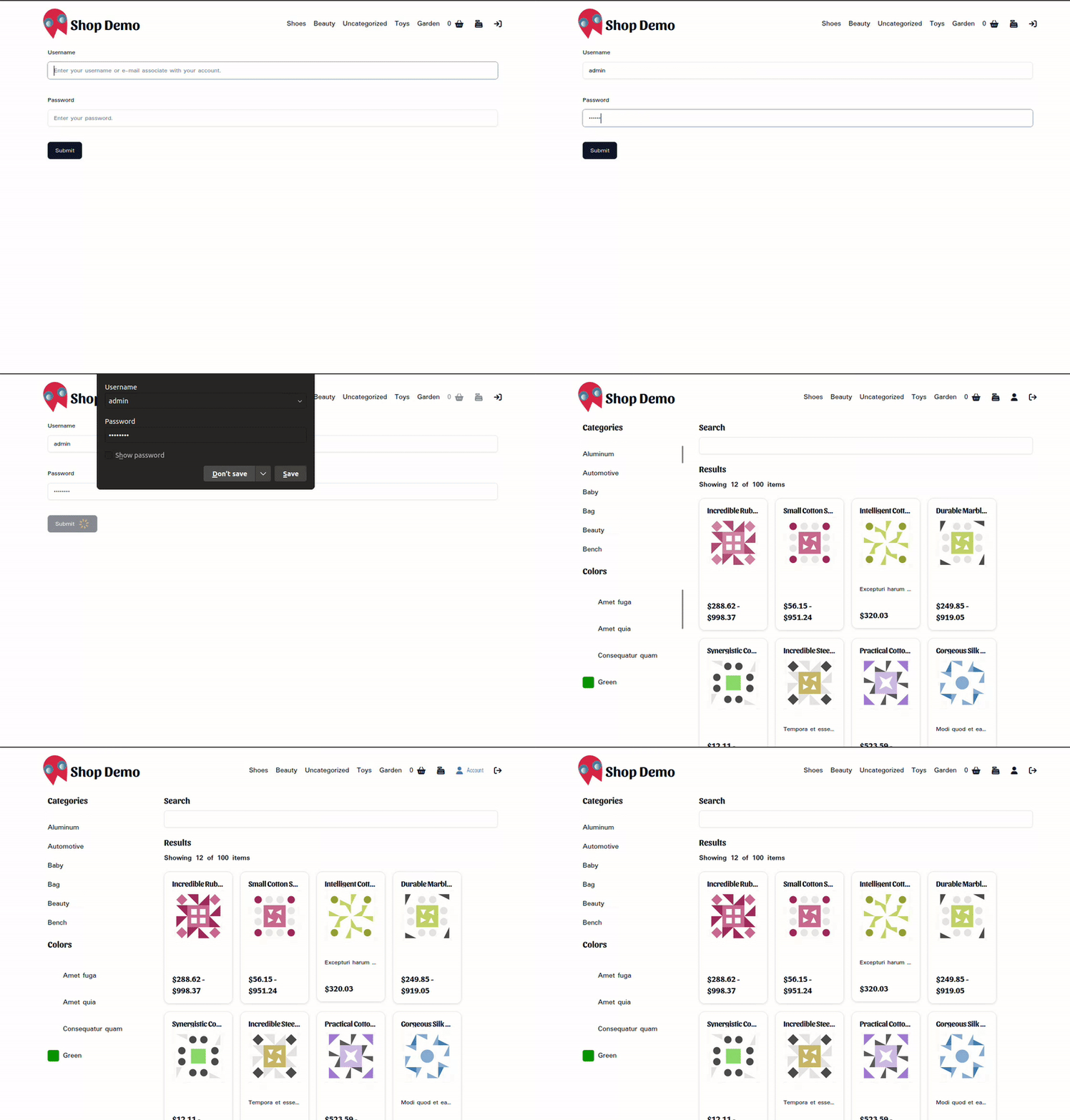
在更新了会話預覽器后, 登入與其它使用者通訊可選項應能以所期望的方式工作, 但是您可能需要以 WP 安裝的樣式來做相當相當相當相當相當相當相當相當相當相當相當相當相當相當相當相當相當相當相當相當相當相當相當相當相當相當相當相當相當相當相當相當相當相當相當相當相當相當相當相當相當相當相當相當相當相當相當相當相當相當相當相相相相相相相相相相相相相相相相相相相相相相相相相相相相相相相相相相相相相相相相相相相相相相相相相相相相相相相相相相相相相相相相相相相相相相相相相相相相相相相相相相相相相相相相相相相相相相相相相相相相相相相相相相相相相相相相
第 二 部 分
在下一個教程中,我們要用出品單頁和推車可選項完成我們的應用程式. 希望這所教學所能讓你有樂子 就下所見了
Leave a Reply